Readable subtitles: line breaks, timing and phone legibility
A readable subtitle is read at a glance, without pausing the video. To get there, I check three things: line breaks that follow the meaning, timing that matches the voice, and legibility on a real phone.

MoBenFreelance video creator
Contents
Readable subtitles are read at a glance, at the pace of the voice, without anyone having to pause. To get there, I check three things on every video: segmentation (each subtitle carries a complete idea), timing (the text arrives with the speech and stays long enough) and legibility on a phone (size, contrast, nothing hidden by the app interface).
Adding subtitles is not just generating text, picking an animation and moving on. If viewers have to scroll back to understand, the subtitle failed. To choose a method (automatic, burned-in or SRT file) and set the style, I wrote a separate guide on subtitles for Reels, TikTok and Shorts. Here, I only cover what makes a subtitle easy to read.
Why do some subtitles make people pause the video?
Three causes come up again and again. The text is broken in the wrong place, so the brain has to wait for the next line to understand. It goes by too fast, or arrives after the voice. Or it is too small, low in contrast, or hidden by the app’s buttons. Each cause needs its own check, so I take them in order.
How do you break subtitles into units of meaning?
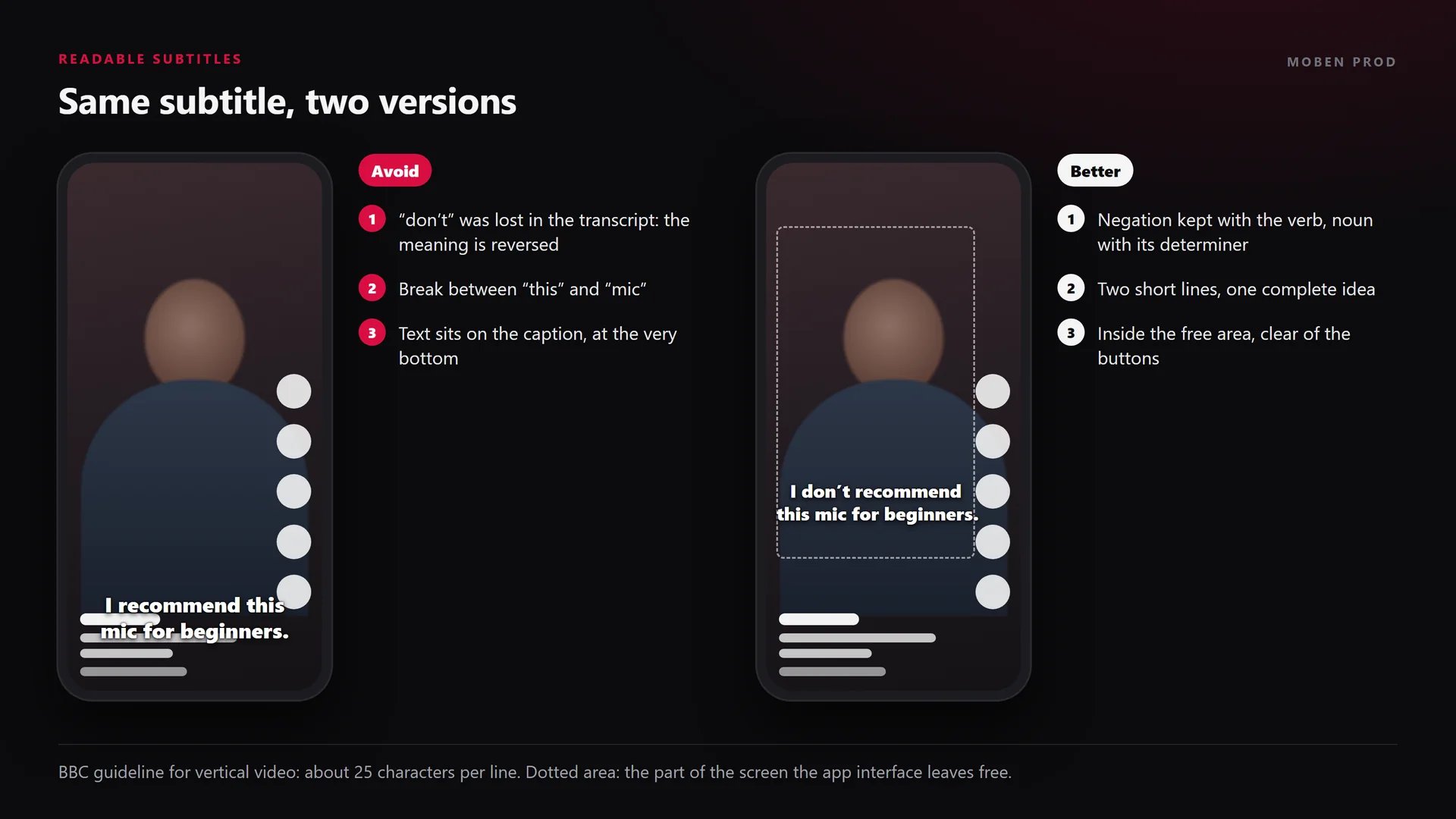
A subtitle groups the words that belong to the same meaning. You do not cut a sentence at random just to keep a line short. The BBC subtitle guidelines ask for breaks at natural points in the sentence, ideally between clauses.
“Sentences should be segmented at natural linguistic breaks such that each subtitle forms an integrated linguistic unit.” BBC Subtitle Guidelines
In practice, the BBC and Netflix guides list the words you should not split across two lines:
- an article or determiner and its noun (“this | mic”);
- a noun and its adjective, a first name and a last name;
- a pronoun and its verb (“they | will come”), the parts of a complex verb (“have | eaten”);
- a verb and its negation (“do | not recommend”).
Netflix’s general requirements spell it out: break after punctuation, before a conjunction or before a preposition, and never separate a verb from its negation. The Netflix English guide adds the line and speed limits I use below.
How many characters per line on a vertical screen?
Netflix sets 42 characters per line and 2 lines at most, but for a landscape screen. For vertical video, the BBC gives a more useful benchmark: a line can use 90% of the width of a 9:16 video, which equals about 25 characters, and up to 3 lines are acceptable if nothing important is hidden. In practice, I stay at two short lines: beyond that, the text eats the picture.
Names, numbers, negations: the words that flip the meaning
Some words leave no margin for error. A misspelled name, a wrong number or a dropped negation, and the sentence says the opposite. In Moroccan Darija, if “ماشي” disappears, “ماشي مزيان” (not good) becomes “مزيان” (good). Automatic transcription often misses these words, especially with fast speech, mixed languages or loud music. I check them one by one while listening to the sentence, before any styling.
How long should a subtitle stay on screen?
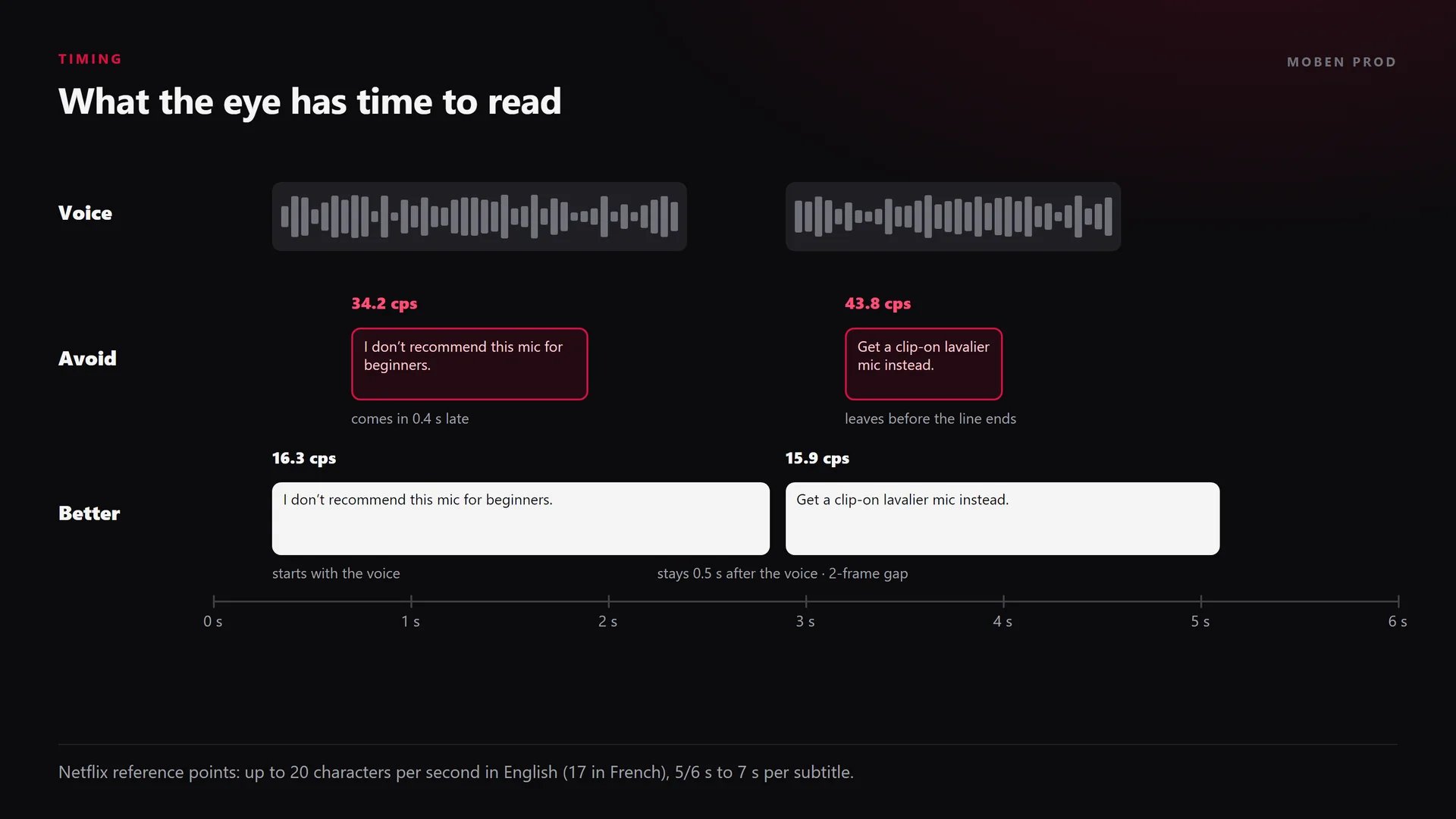
A subtitle should appear when the person starts speaking and stay long enough to be read at normal speed. These are the benchmarks Netflix publishes:
- In-time: on the first frame of speech, within 1 or 2 frames (Netflix timing guidelines).
- Out-time: ideally at least half a second after the speech ends.
- Duration: from 5/6 of a second (20 frames at 24 fps) to 7 seconds per subtitle.
- Gap between subtitles: at least 2 frames. Gaps of 3 to 11 frames are closed to 2 frames to avoid a flicker.
- Reading speed: up to 20 characters per second in English and Arabic for adult programmes, 17 in French.
The BBC thinks in words: 160 to 180 words per minute, or about 0.33 seconds per word. It also says a subtitle should never appear more than 2 seconds after the words were spoken, and recommends extra time for long figures and unfamiliar words.
The reading test I always run
I watch the whole video once, sound off, at normal speed, without touching the screen. If I need to go back even once to read, the subtitle is too long, too fast or badly broken. I shorten the sentence, split it differently or extend it into the silence that follows.
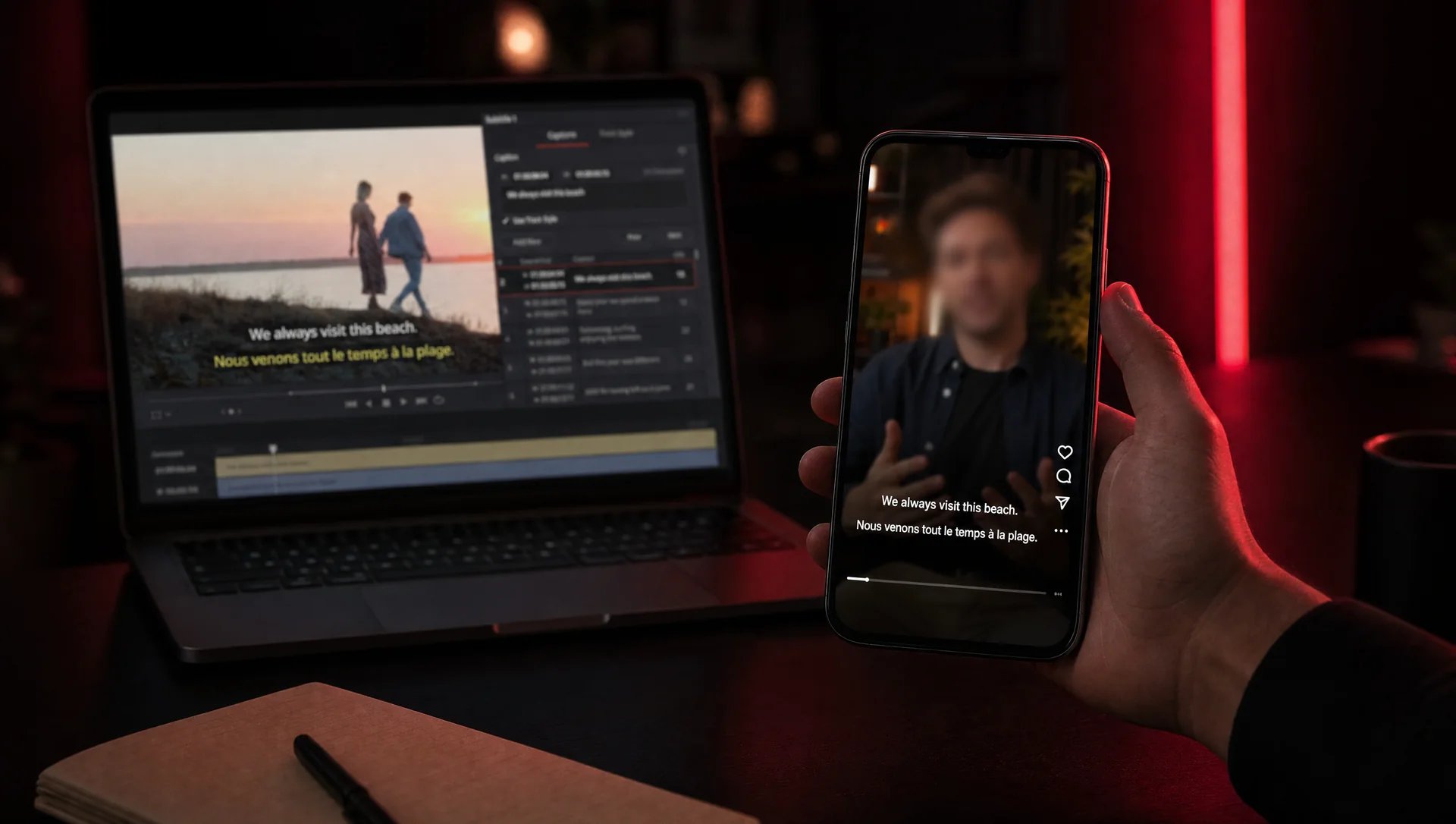
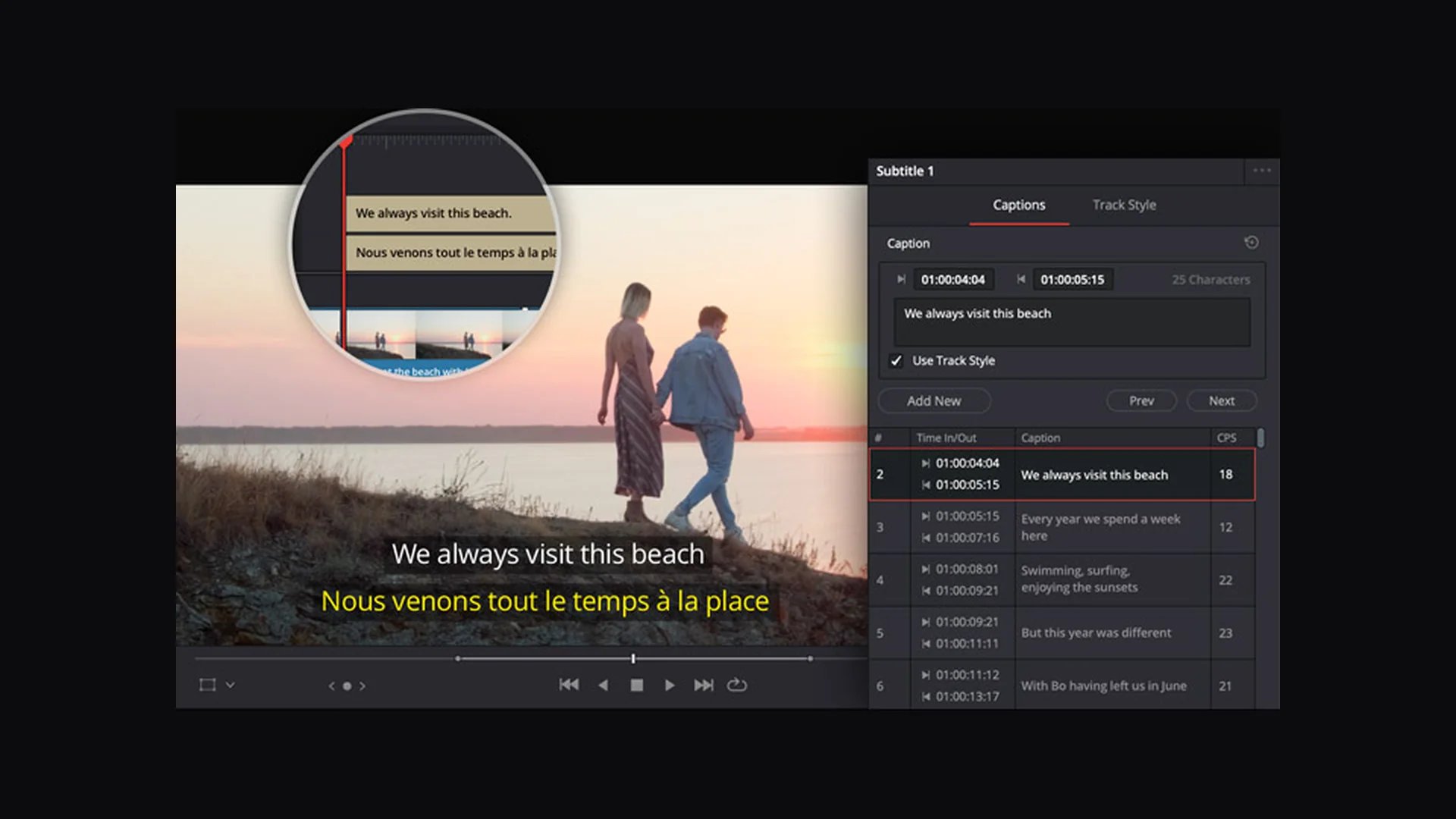
Editing software helps with this check. In DaVinci Resolve, the subtitle list shows the character count and the reading speed in characters per second (CPS) for each line, as the official Edit page shows. In Premiere Pro, the Create captions dialog lets you set the line length, the duration of each caption, the gap between captions and single or double lines (Adobe Help).
How do you check legibility on a phone?
I never sign off subtitles on the editing monitor. I export them and watch them on a real phone, held in my hand, with the app interface on top. I ask three questions:
- Size: can I read without squinting, holding the phone the way I usually do?
- Contrast: does the text stay sharp on the brightest shot of the video? WCAG criterion 1.4.3 asks for at least 4.5:1 for regular text and 3:1 for large text. On a moving picture, an outline, a shadow or a semi-opaque box keeps that contrast. The BBC uses white text on a black background in most cases.
- Placement: do the caption, the account name or the buttons on the right hide part of the text? The areas to avoid are covered in the guide to safe zones for Reels, TikTok and Shorts.
I also look at what sits behind the text. A subtitle over a mouth, a product or a price is as annoying as an unreadable one. When something important fills the bottom of the frame, I move the text up for that shot.


Checklist before posting
- Each subtitle is a complete idea, with no break between determiner and noun, verb and negation, first and last name.
- Names, brands, numbers and negations checked against the audio.
- Two short lines at most, about 25 characters per line in vertical video.
- Text comes in with the voice and stays about half a second after it.
- Speed under 20 characters per second in English (17 in French).
- Whole video watched on a phone, sound off, without pausing once.
- Nothing hidden by the caption, the account name or the buttons.
The mistakes I fix most often
- Posting the automatic transcript as is, without listening again.
- Breaking every line after the same number of words, whatever the meaning.
- Showing one word at a time on a long sentence: viewers never see the full sentence.
- Animating every word until reading is harder than listening.
- Pinning subtitles to the very bottom of the screen, under the app caption.
Frequently asked questions
How many words per subtitle on a Reel?
There is no fixed number: meaning decides. As a benchmark, the BBC counts about 25 characters per line in vertical video, and I stay at two lines. If the sentence does not fit, I spread it over two subtitles, split between clauses.
Are word-by-word subtitles easier to read?
They draw the eye to a hook or a short line. On a long explanation, they tire viewers quickly because the full sentence is never on screen. I keep them for key moments and use full sentences for the explanation.
Should subtitles be word for word?
The BBC notes that viewers prefer subtitles that stay close to what is said. So I keep the speaker’s words, only remove hesitations and repetitions that add nothing, and never touch names, numbers or negations.
What reading speed should I aim for?
Netflix’s benchmarks are 20 characters per second in English and Arabic and 17 in French, for adult audiences. On a Reel watched while scrolling, I aim lower. The real test is still reading it on a phone at normal speed.
A subtitle is not moving decoration: it has to carry the speech. Subtitles that read right the first time are part of my work in Reels and short-form content and editing and post-production. If your videos need them, tell me about your project.
Go further