Voice and music: mixing so every word stays clear
If your video is built on speech, the mix starts with the voice alone, then the music comes in underneath. I lower the music while someone talks, let it breathe in the pauses, and check on headphones as well as on a phone speaker.

MoBenFreelance video creator
Contents
When a video is built on speech, the voice comes first and the music sits underneath. I set the voice on its own first, even out its level from shot to shot, then bring the music in gradually: lower while the person talks, a little higher in the pauses. That is called ducking.
It happens all the time: you buy a good microphone so people hear you clearly, then in the edit the music covers your voice. The mic is not the problem. It is a matter of order and balance in the mix.
Why start the mix with the voice alone?
If the music is there from the start, you set the voice against it and end up pushing both up forever. With the music muted, I hear what the voice really has: one shot quieter than another, some hiss, a room that echoes. I fix all of that first, on the voice alone.
In Premiere Pro, the Essential Sound panel is made for this. You tag the clip as Dialogue, then the Loudness tab offers Auto-Match, which keeps the volume consistent from clip to clip and shows the measured LUFS value under the button (Adobe Help). The Repair and Clarity sections, or Enhance Speech, then clean up the voice if needed.
How do you even out voice levels between shots?
- Play all the takes back to back with the music muted: none should sound closer or further away than the one before.
- Fix the gain clip by clip, or run an automatic match, then listen again: the tool measures an average, not your intent.
- Watch the peaks: a laugh or a stressed word must not clip.
- Once the voice is set, keep that level as your reference: it decides where the music goes.
How do you place music under a voice?
The music comes in next, gradually. I raise it until it is present, then bring it down until every word is clear without effort. If I have to strain to follow a sentence, it is too loud. Music with vocals, or busy in the same frequencies as the voice, needs to go lower still, or be replaced.
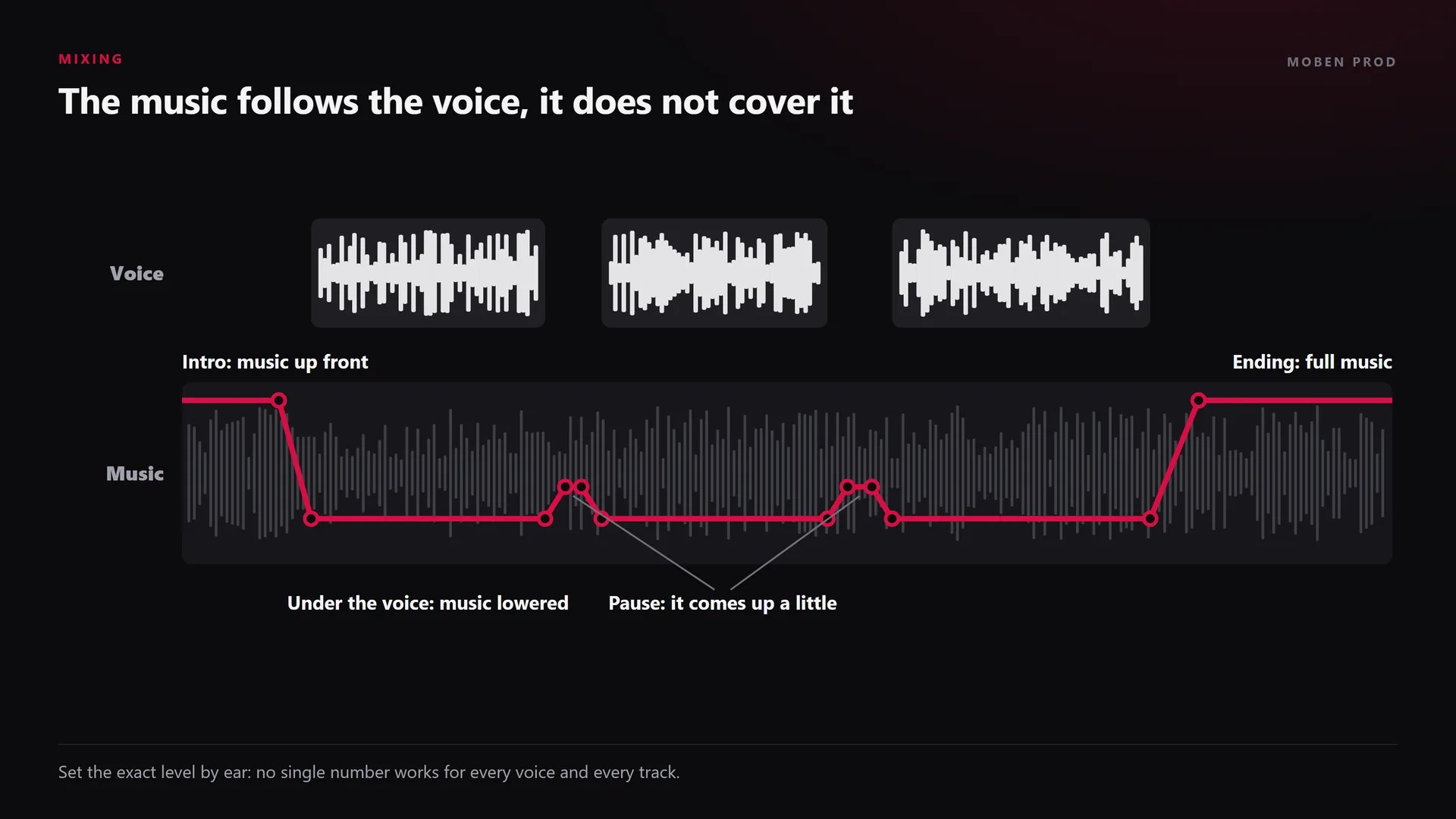
It does not need to stay at one level for the whole video. During an intro without speech, it can sit up front. As soon as the voice starts, it drops. In a pause, it comes up a little to keep the rhythm, then dips again before the next sentence.
What is ducking and how do you automate it?
Ducking means lowering one sound (the music) whenever another is present (the voice). You can draw it by hand with volume keyframes, or let the software create them and then adjust.
“Ducking allows the volume of a target track, such as music, to be lowered during dialogue and raised when it ends.” Blackmagic Design, Fairlight page
In Premiere Pro
According to Adobe’s help page on automatic ducking, it all happens in the Essential Sound panel:
- Select the voice clips and tag them as Dialogue.
- Select the music, tag it as Music and turn on Ducking.
- Choose the type of sound that triggers the dip: here, dialogue.
- Set the sensitivity, the amount of reduction and the fade length. The Fade Position option places the fade outside, inside or across the start of the dialogue.
- Click Generate Keyframes: Premiere adds a gain effect and its keyframes on the music.
It is not a black box: the keyframes stay visible and editable. I adjust them by hand where the dip comes too late or recovers too fast. Careful: clicking Generate Keyframes again replaces the existing keyframes, manual tweaks included.
In DaVinci Resolve (Fairlight page)
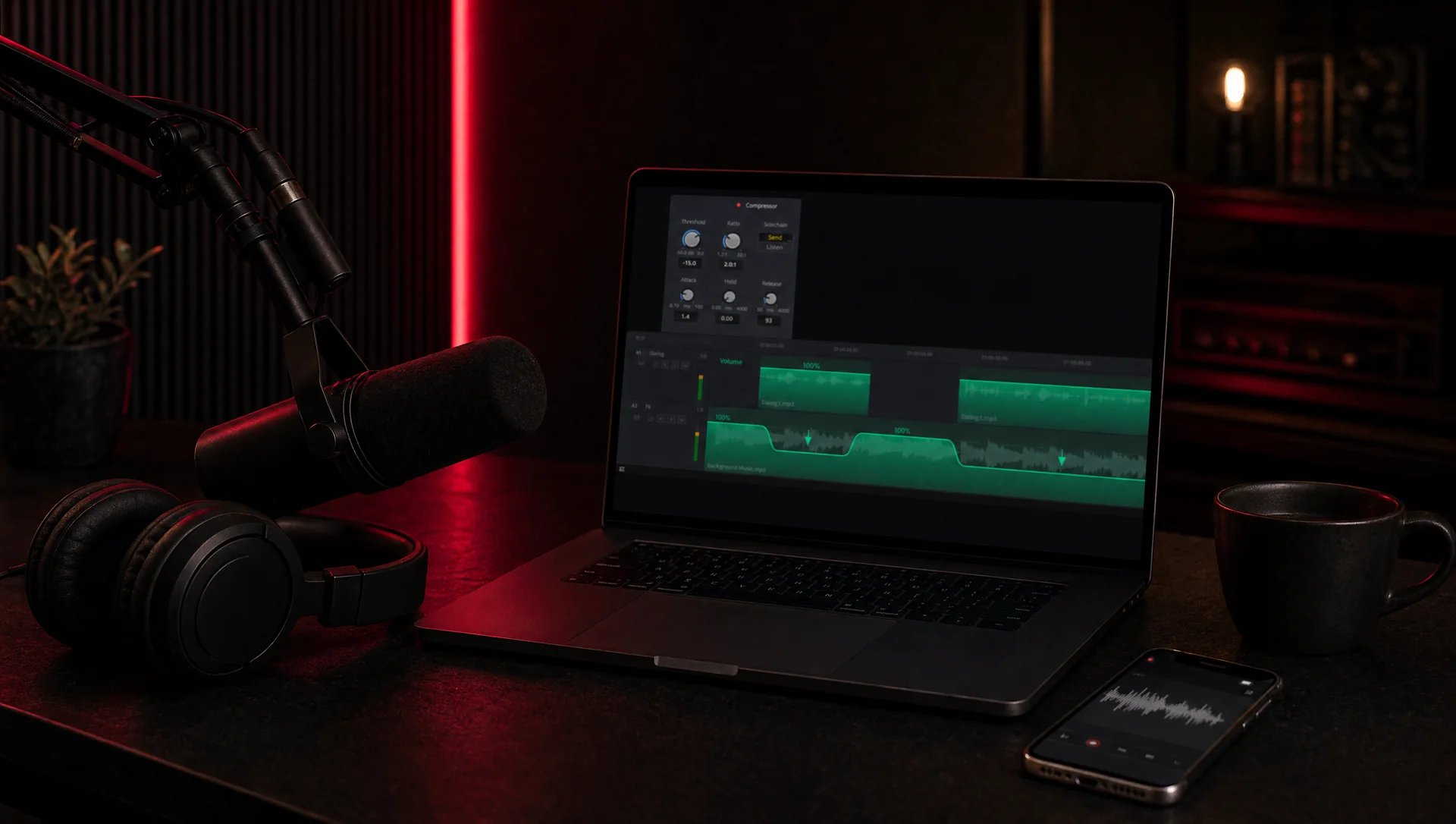
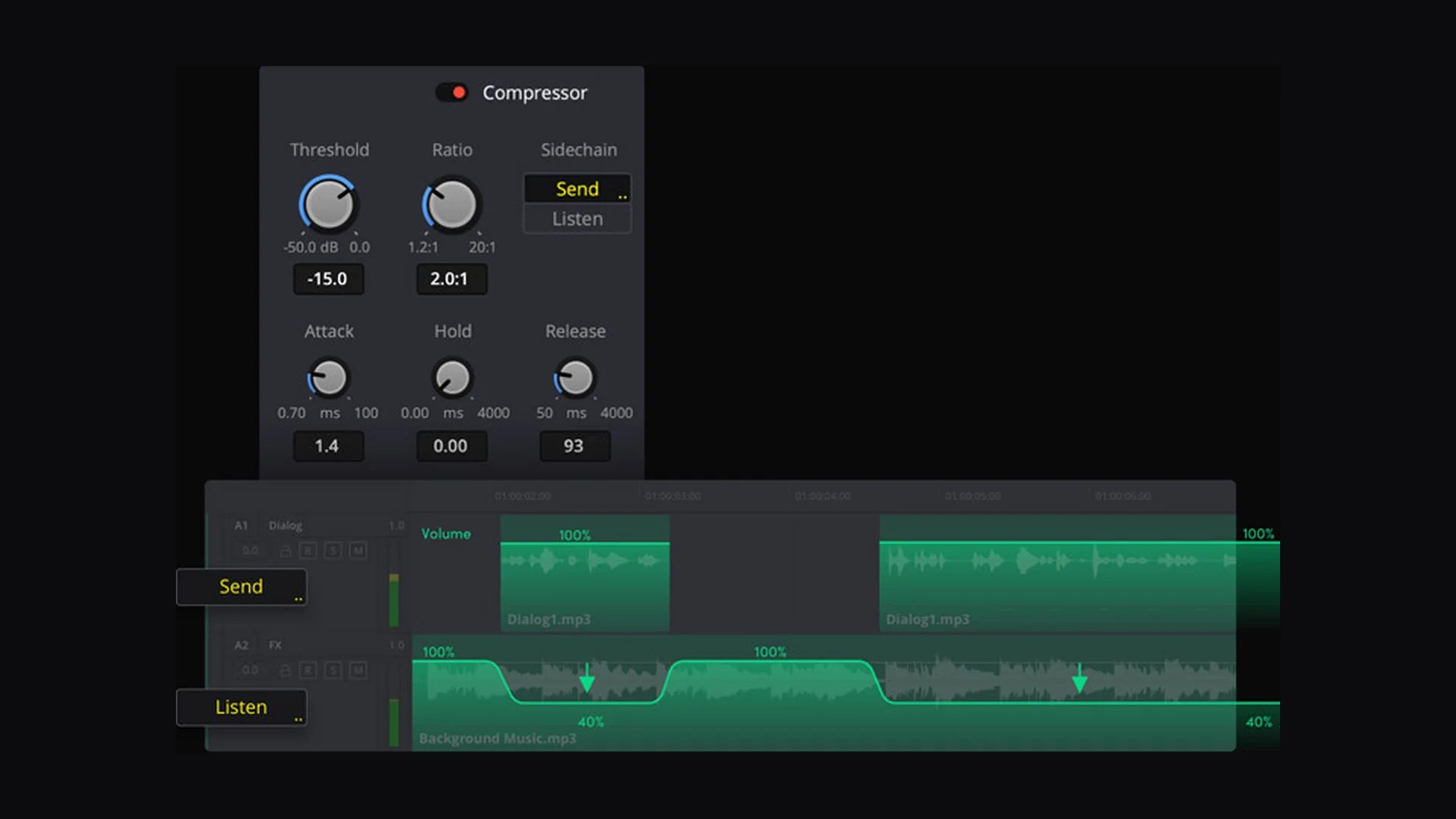
Blackmagic Design’s Fairlight page describes a track FX ducker: you open it on the music track, pick the dialogue track or tracks as the source, then set the amount of reduction and how quickly the music comes back. The official screenshot below shows the idea: the dialogue track sends the signal, the music track listens and dips.
In Final Cut Pro and other editors
The Final Cut Pro user guide presents ducking as temporarily lowering the volume: with the Range Selection tool (R key), keyframes are added automatically across the selected range, and you just pull the volume down. Whatever the software, the principle stays the same: a gentle dip before the sentence, a gentle recovery after.

Why test on a phone speaker?
On headphones you hear everything: the voice stays clear even with fairly loud music. A phone’s small speaker gives little bass and pushes the mids, where the voice sits. Music that is busy in those frequencies can then mask words. So I always listen three times: on headphones for detail, on speakers or a laptop, then on the phone speaker, at the volume people actually use.
If a word gets lost on the phone, I do not push the whole voice up: I lower the music at that exact spot, or carve a little of its mids with an EQ.
Is there an ideal music setting?
No. No single number works for every video: a deep, calm voice does not behave like a fast one, and a solo piano does not get in the way like a pop track with vocals. I set it by ear, then check it on several systems.
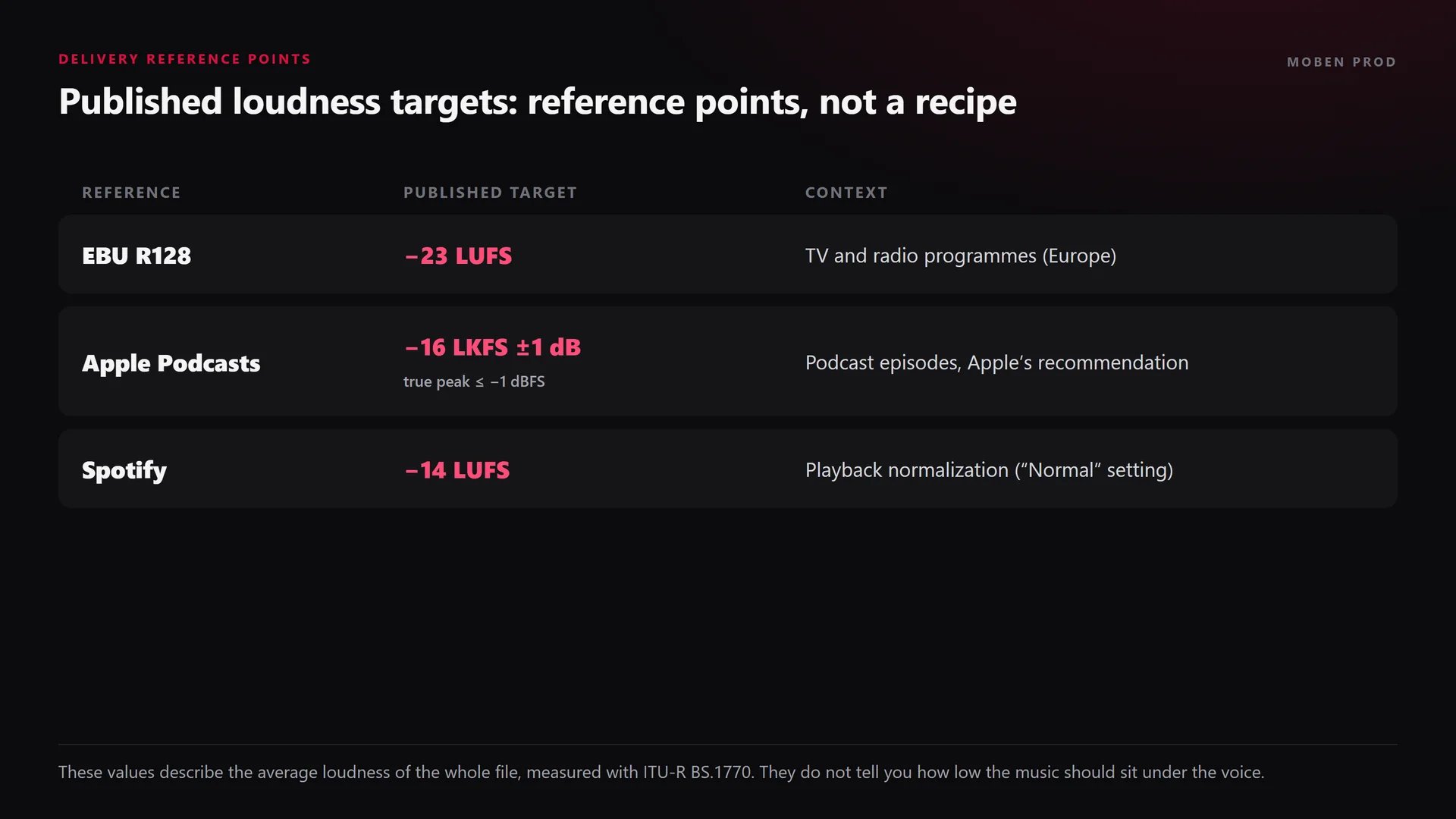
The numbers you see online describe something else: the average loudness of the final file, measured in LUFS with ITU-R BS.1770. They are delivery targets published by broadcasters and platforms, not the gap between voice and music:
- EBU R128: −23 LUFS for television and radio programmes in Europe.
- Apple Podcasts: around −16 LKFS, within 1 dB, with a true peak no higher than −1 dBFS.
- Spotify: playback normalized to −14 LUFS on the “Normal” setting.
Adobe Media Encoder can normalize loudness on export to these standards (EBU R128, ATSC A/85 or ITU BS.1770-3), according to Adobe’s page on automatic loudness correction. For a video podcast, the podcast editing workflow covers the full chain.
Mistakes that bury the voice
- Laying the music first and fitting the voice to it.
- Keeping the music at the same level from the first second to the last.
- Judging the mix on headphones only.
- Pushing the voice until it clips instead of lowering the music.
- Leaving abrupt dips: a fade that is too short is as noticeable as music that is too loud.
Frequently asked questions
How loud should music be under a voice?
There is no universal value. Lower the music until every word is clear without effort on a phone speaker, then check on headphones that it is still present. LUFS targets apply to the final file, not to this gap.
Is automatic ducking enough?
It saves time, but I treat it as a first pass. I listen to every transition again and fix the keyframes where the dip comes too late, recovers mid-sentence or makes the music pump.
Does the whole video need music?
No. Music serves rhythm and emotion. If it adds nothing under a technical explanation, I remove it, or keep it only for the intro and the ending.
Why does my voice sound fine on headphones and bad on a phone?
A phone speaker does not reproduce sound the way headphones do. The music can mask the voice in the frequencies the phone brings forward. Always test the mix on a phone before posting.
A good mic is wasted if the music hides what it captured. Mixing voice and music is part of every editing and post-production and podcast and interview project I work on. If your voice gets lost in your videos, tell me about your project.
Go further