Sonilo: music created from your edit, no prompt needed
Sonilo analyses your edit (cuts, pace, motion, final frame) and generates original music at the right length, with no prompt required. The full how-to, the plans, the rights for client work and the alternatives.

MoBenFreelance video creator
Contents
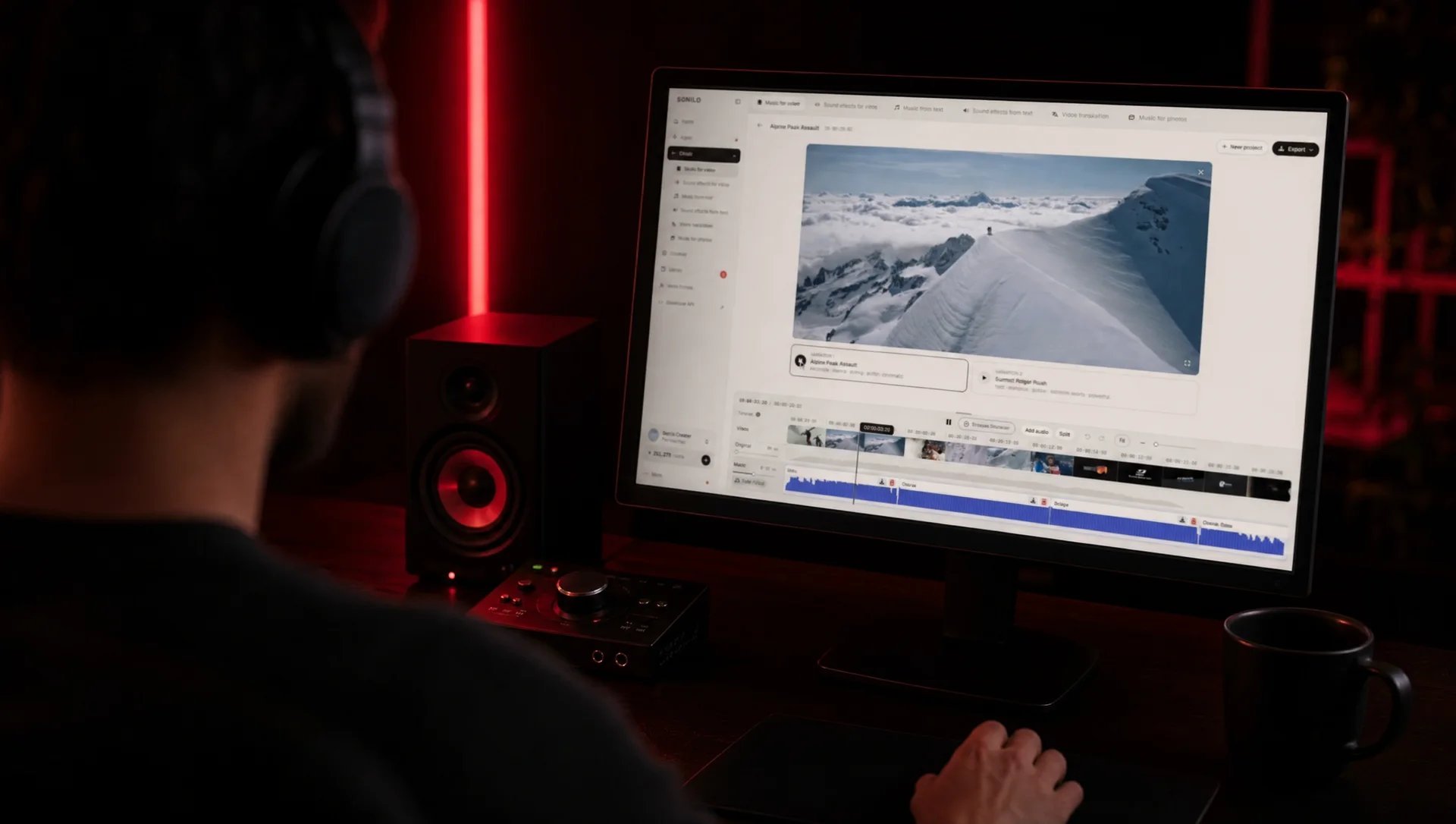
Sonilo is an online tool that creates original music from your video. You upload your edit as MP4, MOV or M4V, it analyses the picture (cuts, pace, motion, spoken passages, final frame) and generates two versions fitted to the length. Text is optional. The free plan is for testing: to download the music and use it for a client, you need a paid plan.
Have you ever finished an edit, then spent hours looking for music to go with it, trying one track, then another, until one more or less works? Sonilo takes the problem the other way round: the music starts from your video.
What is Sonilo?
Sonilo is made by Sonilo Inc., a company based in Menlo Park, California. Its first version, introduced in March 2026, is described as a video-to-music model. According to its about page, the music responds to pacing, cuts, motion, dialogue space and final-frame timing.
“Sonilo creates music and sound effects that follow your video’s pacing, mood, and scene changes.” (Sonilo)
Two things to know. Sonilo only analyses the picture: your video’s original sound is not used to create the music, but you can keep it underneath. And the company says it trained its model only on licensed catalogues, including Shutterstock’s, with nothing scraped from the internet.
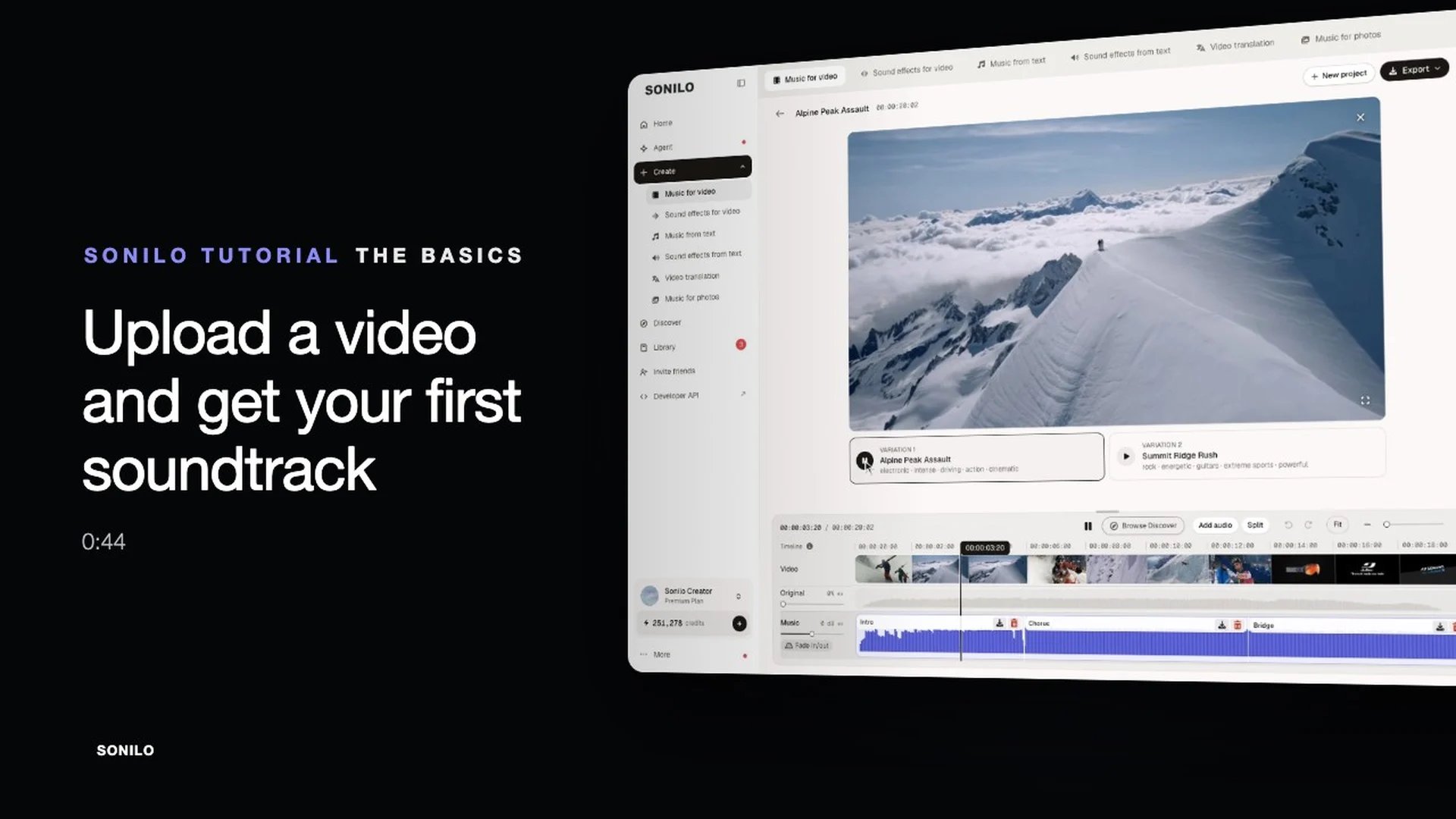
How do you use Sonilo, step by step?
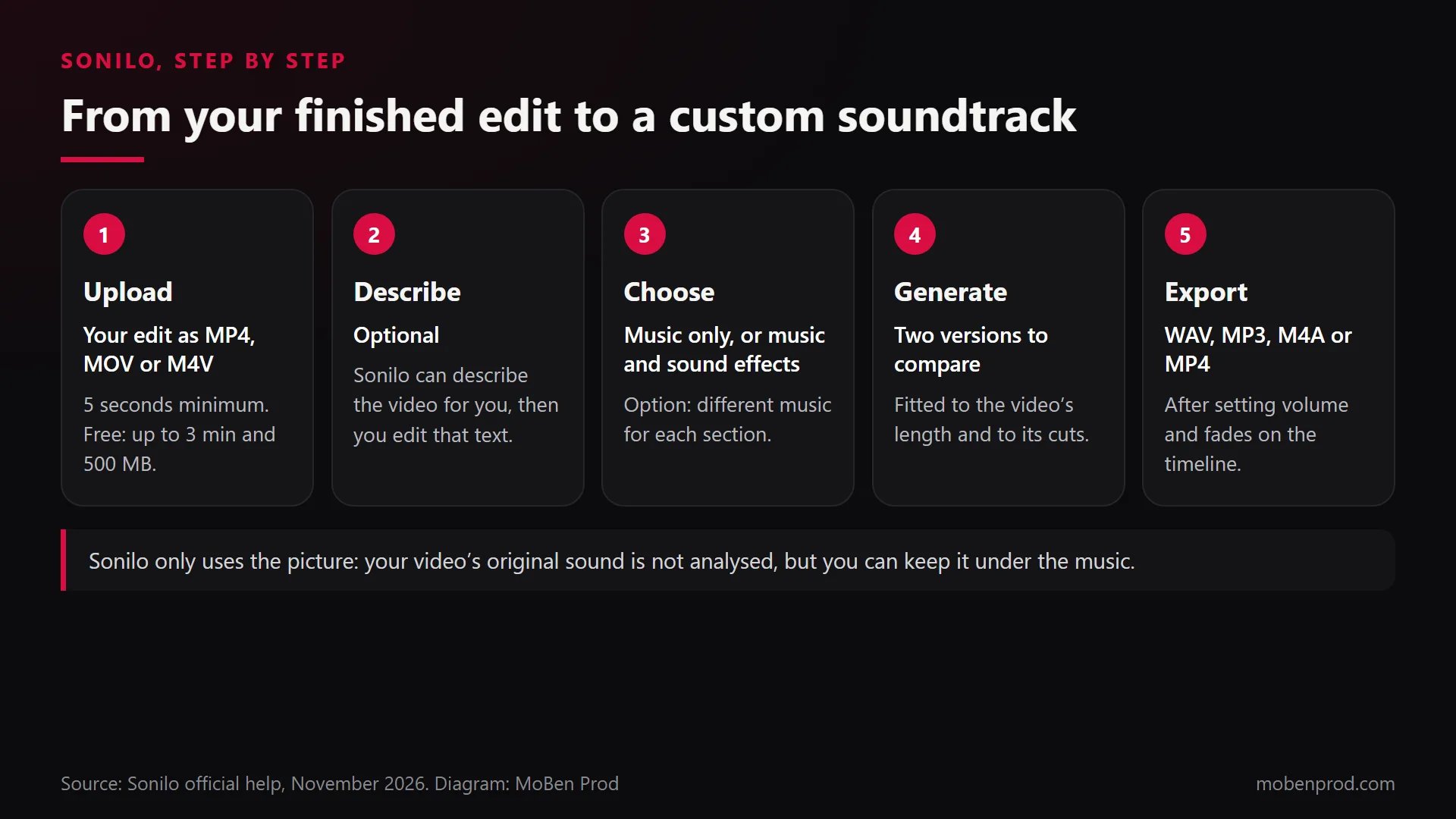
- Create an account on sonilo.com. The free plan needs no credit card.
- Open Create, then “Music for video”. The menu also offers sound effects for video, music from text, video translation and music for photos.
- Upload your finished edit. Accepted formats: MP4, MOV and M4V (convert AVI, MKV or WebM first). Import from Google Drive is possible. The video must be at least 5 seconds long; the maximum depends on the plan: 3 minutes and 500 MB on Free, 8 minutes and 1.5 GB on Pro, 30 minutes and 3 GB on Premium.
- Describe it, if you want. Text is optional. You can let Sonilo describe the video and then edit that text, write your own brief (style, mood, instruments) or ask for a random suggestion.
- Choose music only, or music and sound effects. With the second option, Sonilo also places sound effects on the action.
- Set sections if needed. You can generate for one part of the video only, or split it into up to 8 sections of 5 seconds to 8 minutes, each with its own description. One track is 8 minutes at most: beyond that, the video is scored in sections.
- Generate and compare. Each generation gives two versions. “Regenerate” starts a new generation, billed as such. On Pro and Premium, “Fix one part” redoes only a stretch of 0.5 seconds to 1 minute.
- Adjust on the timeline. Three tracks: original sound, music and sound effects, with volume, fades and split. If there is a voice, lower the music under it: I explain how in mixing voice and music.
- Export. Music only as M4A, WAV (48 kHz, 16-bit) or MP3 (320 kbps), or the video with its music as MP4. The WAV is made from an AAC file: it is not a lossless master. On Free, the music plays on the site, but downloading it needs a paid plan.
- Get the licence. On Pro and above, the library offers “Download commercial license”: a certificate anyone can verify on the site. Keep it with the client’s project.
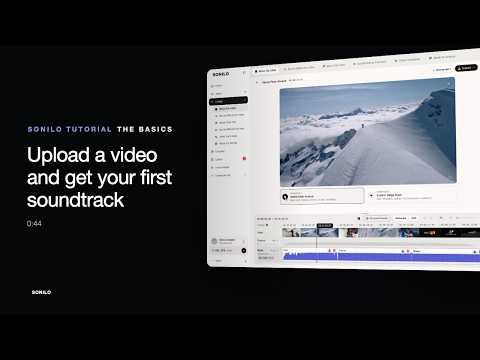
Sonilo shows this path itself in its tutorial:
Other features that help an editor
- The Premiere Pro plug-in: you mark a range on your timeline and Sonilo fills it, without leaving your software.
- Batch processing: up to 10 videos at once, handy for a series of Reels. You can also join up to 10 clips.
- Stem splitting: a separate tool splits vocals, drums, bass and the rest (Pro and above).
- Sound effects only: generated from the video or from text. To compare with ready-made sounds, see my free SFX pack.
How much does Sonilo cost?
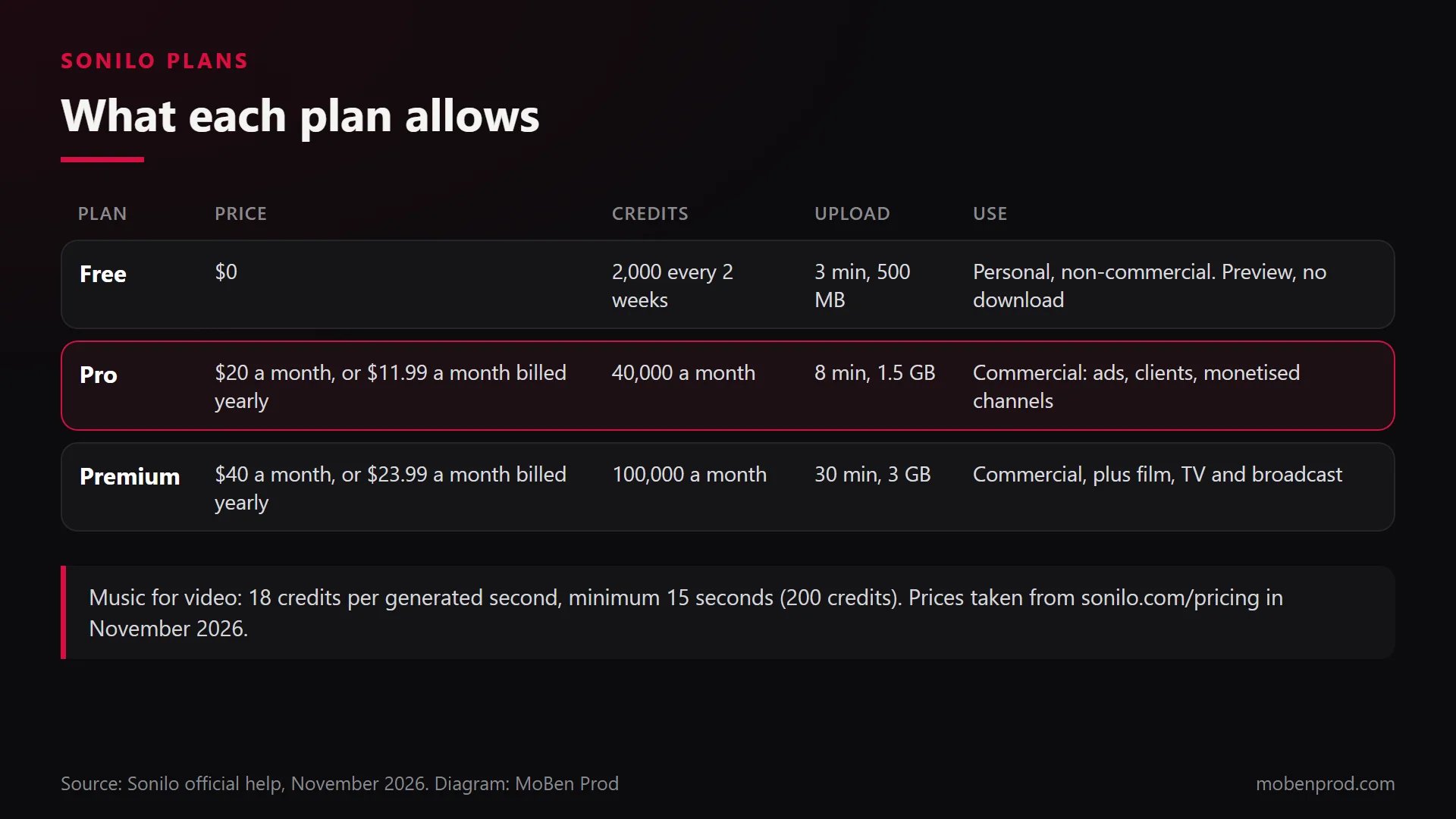
Everything is paid in credits: music for video costs 18 credits per generated second, with a minimum of 15 seconds (200 credits) per generation. Subscription credits don’t roll over. Here are the plans as shown on the pricing page in November 2026:
- Free: $0, 2,000 credits every two weeks (about 7 soundtracks of 15 seconds), one task at a time, personal non-commercial use.
- Pro: $20 a month, or $11.99 a month billed yearly, 40,000 credits a month, unlimited downloads and a commercial licence.
- Premium: $40 a month, or $23.99 a month billed yearly, 100,000 credits a month, adding film, TV and broadcast.
Note: some Sonilo help pages still show different prices. Trust the pricing page at the time you subscribe.
Can you use Sonilo music for a client?
Yes, with a paid plan. According to its licensing page:
- Free: personal, non-commercial use only, with the credit “Music by Sonilo” if you share a file.
- Pro: ads, branded content, client deliverables, monetised channels, apps, websites and small indie games, with no attribution.
- Premium: adds film, TV, broadcast and studio games.
- No plan lets you release a generated track on Spotify, Apple Music or other streaming services.
- Rights follow the plan active when the track was generated: a track made on Free doesn’t become commercial if you upgrade later.
On YouTube, Sonilo doesn’t register its tracks with Content ID, but says a claim is still possible. The licence certificate then helps you dispute it. Sonilo also states that generated music is non-exclusive and may not qualify for copyright protection in every country.
My tips for music that really serves the edit
- Upload the locked edit. The music follows your cuts: if you change the edit afterwards, it won’t land right anymore.
- Decide first what the music should do: carry an emotion, give pace, or stay discreet under a voice. Put it in the description.
- Use sections when the video changes part, for example a calm intro followed by a product presentation.
- Listen to both versions with the picture, not on headphones alone: what matters is how image and sound work together.
- Measure the real time: generation, listening, fixes and export, compared with your usual music search. That is the method in my worksheet for testing a tool.
Which other tools create or fit music to a video?
Sonilo is not alone. Here are the tools whose features and terms I checked on their official pages in November 2026, grouped by what they take as input.
They start from your video
- Adobe Firefly, Generate music: analyses the uploaded video, suggests a description and gives 4 versions from 5 seconds to 5 minutes. Free daily generations with an Adobe account; Adobe presents it as commercially safe.
- ElevenLabs, Instant Soundtracks: scores an uploaded video and can add sound effects at the right moments. The free plan is for personal use.
- Artlist, Music Match: reads a short clip and returns the video with music, covered by the Artlist licence.
- Mubert Fuse: generates or picks music matching the clip’s length and mood. Free in 720p with a watermark; commercial licence from the Lite plan.
- Beatoven.ai: takes text, reference audio or a video, then lets you change instruments, genre, tempo and emotion. Lifetime non-exclusive licence.
- Filmora, Smart BGM Generation: analyses the visuals and timing of the edit inside the software to create synced music.
They fit existing music to the right length
- Premiere, Remix: shortens or lengthens a track while keeping its start and end, typically within one second according to Adobe. Included in Premiere.
- DaVinci Resolve Studio, AI Music Editor: type the target length and it rearranges the music. Built for beat-driven tracks, not ambient ones.
- Epidemic Sound, Adapt: adapts a catalogue track to 15, 30 or 60 seconds, or a custom length up to 5 minutes, and can remove vocals. Covered by the subscription.
- Canva, Beat Sync: does the reverse, it snaps your cuts to the beat of a track.
They start from text or a length
- Premiere, Generate Music (beta): select a range on the timeline, describe the music and set the tempo. Instrumental only.
- Soundraw: genre, mood, length and instruments, with bar-by-bar editing. Paid plans with commercial use.
- AIVA: 250+ styles. On Free, AIVA owns the copyright and monetisation is not allowed; you own it on the Pro plan.
- Suno: songs from text. No commercial rights on Free, commercial rights on Pro and Premier.
- Stable Audio: tracks up to six minutes from text or audio. Stability AI allows commercial use even on Free.
- CapCut: music generator from text, plus automatic beat marking to place your cuts.
Avoid for client work: Udio, whose official help says downloading is disabled, and YouTube’s Dream Track, limited to Shorts with no download.
Frequently asked questions
Do you need to write a prompt in Sonilo?
No. Sonilo can generate music from the video alone. A short description (mood, instruments, what the music should do) helps when the first version doesn’t match what you have in mind.
Does Sonilo keep my video’s sound?
Yes, if you want. The original sound stays on its own track: you can keep it, lower it, replace it or layer the music over it.
Can Sonilo music get a Content ID claim?
It is possible, according to Sonilo, even though it doesn’t register its tracks with Content ID. Keep the licence certificate of each project to dispute a claim.
How long can the video be?
From 5 seconds to 3 minutes on Free, 8 minutes on Pro and 30 minutes on Premium. One track is 8 minutes at most: a longer video is scored in sections.
A tool suggests music; deciding what it should tell remains the editor’s job. If you want an edit where picture and sound are designed together, here is how I handle editing and post-production. Tell me about your project.
Go further