
Google Stitch: design a website mockup from a single prompt
Google Stitch, from Google Labs, turns a prompt into a website or app mockup, with variations, a clickable prototype and export to Figma or HTML. Here is the full how-to, 24 ready-to-copy prompts and what is left to do before you publish.

MoBenFreelance video creator
Contents
- What is Google Stitch?
- How much does Stitch cost and what are its limits?
- How do you use Google Stitch, step by step?
- How do you write a good prompt for Stitch?
- Which prompts can you copy into Google Stitch?
- What is left to do before publishing the website?
- What are the alternatives to Google Stitch?
- My take on Stitch as a designer
- Frequently asked questions
Google Stitch is an experimental Google Labs tool, available with a Google account, that generates website and app mockups from a short text, an image or your voice. You refine the result, ask for variations, link the screens into a clickable prototype, then export it to Figma or as HTML code. It is a visual starting point, not a website ready to go live.
Want to build a website and keep spending evenings on Pinterest or Behance looking for ideas? With Stitch, you describe your project in a few lines and get a first direction within minutes, built around your own content rather than someone else’s.
Official link: stitch.google.com (the old address, stitch.withgoogle.com, redirects there). The official documentation is at stitch.google.com/docs.
What is Google Stitch?
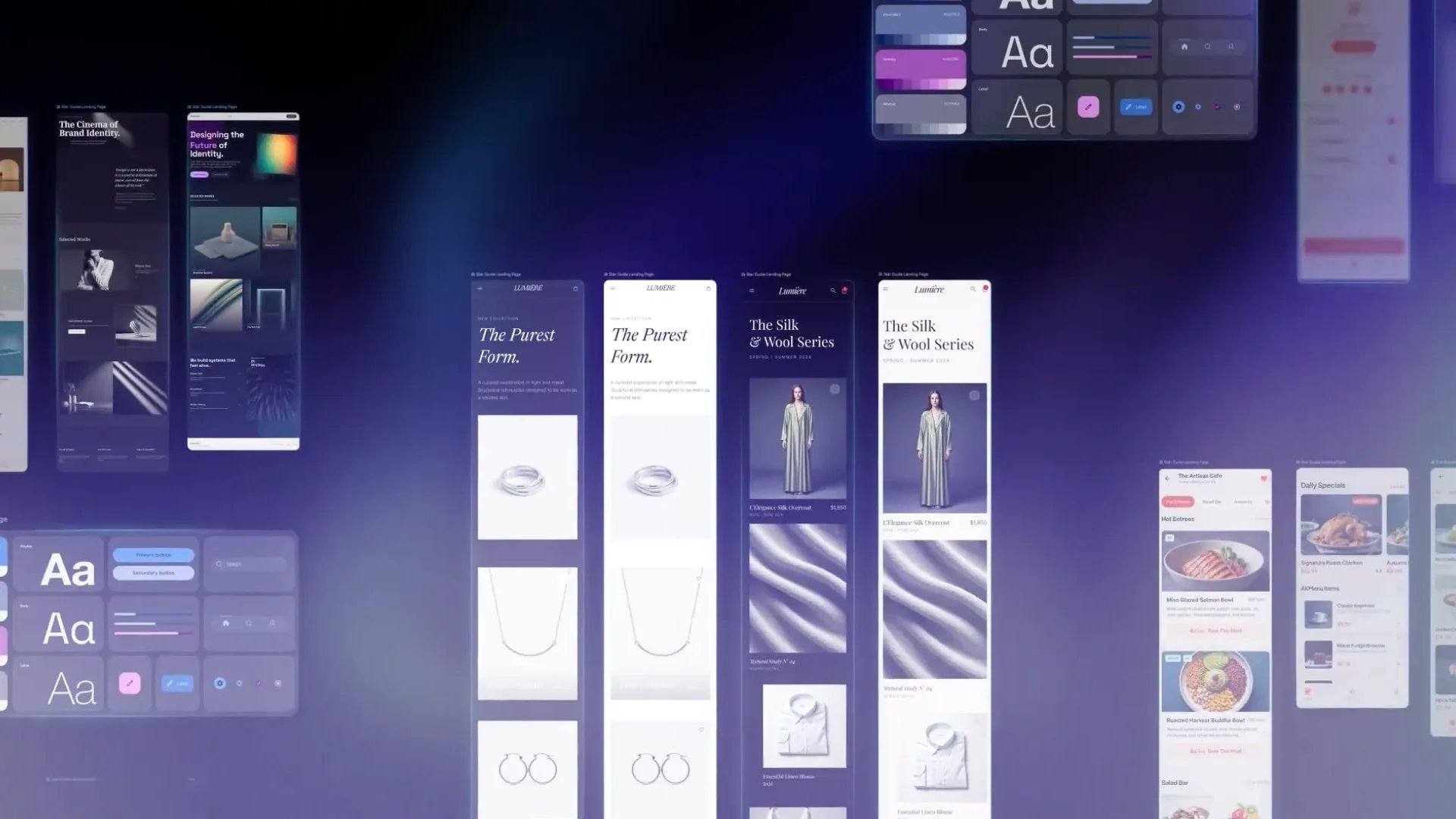
Google introduced Stitch in May 2025 as a Google Labs experiment. According to the Google Developers blog, it turns a prompt or an image (a sketch, a screenshot, a wireframe) into an interface and front-end code. The address of the former Galileo AI tool now redirects to Stitch.
The tool has changed a lot since. In December 2025, Google added Gemini 3 and the Prototypes feature, described as experimental. On 18 March 2026, Stitch became an infinite canvas with a design agent, an agent manager to follow several ideas in parallel, voice control and the DESIGN.md format to carry your design rules from one project to the next.
“You can ‘Stitch’ screens together in seconds and simply click ‘Play’ to quickly preview your interactive app flow.” (Google)
On 19 May 2026, at Google I/O, Google added real-time generation on the canvas, the Stitch Agent that you can steer while it works, and new outputs: a shareable link through Google AI Studio, an export to Google Antigravity and direct publishing with Netlify. Google says these updates are available to users worldwide.
How much does Stitch cost and what are its limits?
Google publishes no price for Stitch: a Google account is enough to use it. Usage is capped by a daily credit quota. When you reach it, the tool shows a message and you have to wait until the next day. Google does not give the number in its announcements, and it has changed several times: in 2025, the team mentioned on the official forum a limit of 50 screens a month for the former Experimental mode.
- Status: a Google Labs experiment. Some features, such as prototypes, are described as experimental and may change.
- One session at a time: the tool will not open a new session on a project that is already active.
- Language: the documentation and its examples are in English. I write my prompts in English, then ask Stitch to switch the copy to French or Arabic.
- Figma export: the documentation recommends the Fast mode for Figma exports. When the copy fails, the Stitch team advised on its forum to switch models or to download the project as a ZIP and import it into Figma.
How do you use Google Stitch, step by step?
- Open stitch.google.com and sign in with your Google account. You land on a prompt box and your projects.
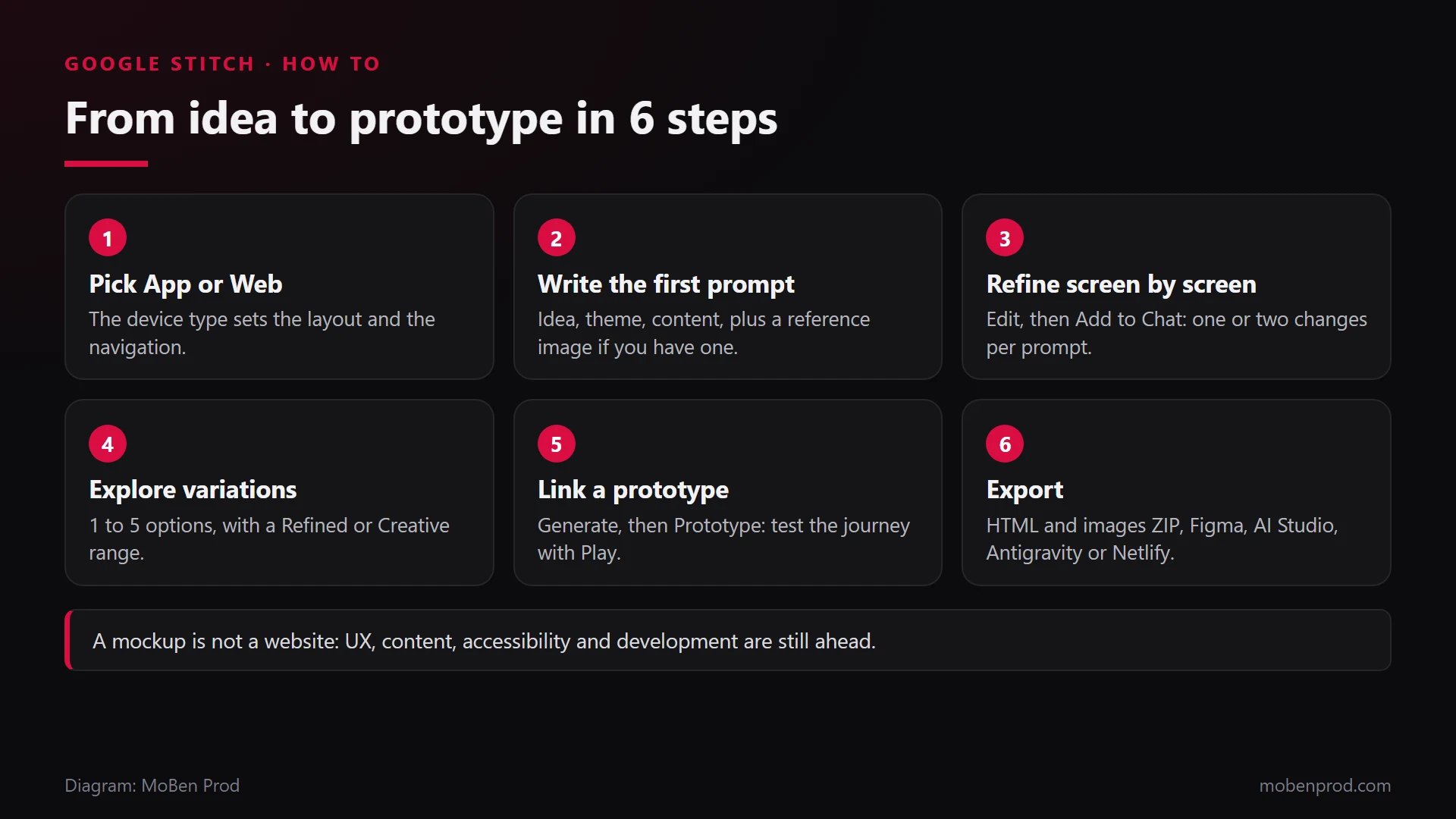
- Pick App or Web. According to the documentation, App mode plans for vertical scrolling and bottom navigation in the thumb zone. Web mode plans for top navigation and multi-column grids. For a business website, start with Web.
- Choose the Design Mode in the generation settings. The documentation describes Thinking with 3 Pro (slower, for complex pages and dashboards), Redesign (to modernise an existing interface from a screenshot), 2.5 Pro (to compare two takes on the same prompt) and Fast (for quick wireframes and Figma export). The names follow the Gemini models: Google’s official March 2026 visual already shows 3.1 Pro.
- Add context with the + button if you have some: an image, a sketch, a screenshot, the URL of a site Stitch can extract a design system from, or a DESIGN.md file.
- Write the first prompt using the documentation’s formula: Idea (what it is), Theme (the mood), Content (what goes on the page), Image (an optional reference). Generate. The first result does not need to be perfect.
- Edit one screen at a time. Select the screen, click Edit then Add to Chat, and ask for one or two precise changes per prompt. Use interface words: navigation bar, call-to-action button, cards, hero section.
- Adjust the theme without a prompt. Select the screen, then Generate and Edit Theme: light or dark mode, accent colour, corner radius and font.
- Generate variations. Stitch offers 1 to 5 options at a time. The Creative Range setting goes from Refined (same structure, new fonts, spacing and colours) to Creative (layout, images and theme fully reworked). You can run variations on top of the variation you picked.
- Build the prototype. Select the screen, then Generate and Prototype, link the screens and click Play. According to Google, Stitch can generate the next screen from a click. Test hover states, forms and text length.
- Talk to the canvas if you prefer. With voice, the agent can critique your design, interview you to build a landing page, or apply requests such as three menu options or other palettes.
- Export. Select the screens and click Download (shortcut Shift + D) to get a ZIP with the HTML code and images. Depending on the options offered, you can also copy to Figma, create a shareable link through Google AI Studio, send to Google Antigravity or publish with Netlify. The html.to.design Figma plugin also imports the Stitch ZIP.
Two shortcuts save time: the ? key lists every shortcut, and Ctrl + K (Cmd + K on Mac) opens the command palette so you can find an action without digging through menus.

How do you write a good prompt for Stitch?
The documentation gives four simple rules. Start broad, then add detail screen by screen. Use adjectives for the mood, because they shape colours, fonts and images. Make one major change at a time when editing. And keep the big swings for variations, since you will pick from several options.
Here is the template I use. Fill in the brackets, then paste the lines one after the other into a single prompt:
- Idea: [type of site or app] for [business], in [city].
- Audience: [who visits], who want to [main action: book, buy, call, request a quote].
- Sections: [hero with the headline "..."], [section 2], [section 3], [contact or booking], [footer].
- Style: [2 or 3 adjectives], [one layout keyword: editorial, bento grid, split-screen, Swiss style].
- Colours: primary [colour or hex code], background [colour], accent [colour].
- Fonts: headings [serif or sans-serif, or a font name], body [font name].
- Device: Web or App.
For colours, start from your brand guidelines if you have them. If you do not, my article on colour systems and contrast helps you choose a readable palette before you hand it to Stitch.
Which prompts can you copy into Google Stitch?
Here are 24 ready-to-use prompts, grouped by type of project. Replace the name, city and colours with your own. The last six are for editing a mockup you have already generated.
Restaurant: landing page, menu and booking
- Landing page, the example from the reel: Idea: A landing page for a family restaurant in Agadir that serves grilled fish and Moroccan dishes. Theme: Minimalist and warm. Terracotta, sand and olive colours, lots of white space, a serif font for headings. Content: Hero with a full-width photo of a table by the sea and the headline "Fresh fish, slow cooked", a menu section with 3 categories and prices, opening hours, a reservation form (date, time, number of guests, phone), a map, customer reviews, and a footer with Instagram and WhatsApp links.
- Menu page: Menu page for the same restaurant. Group dishes into Starters, Grills, Tagines, Desserts and Drinks. Each item shows a name, a one-line description and a price in MAD. Sticky category tabs at the top, a small vegetarian badge, and a "Book a table" button that stays visible on scroll.
- Mobile booking flow: Mobile reservation flow for a restaurant in 3 screens: 1) choose a date and a time among available slots, 2) number of guests and special requests, 3) confirmation screen with a summary, an "Add to calendar" button and a WhatsApp contact button. Warm colours, large touch targets, minimal text.
Real estate
- Agency website: Idea: A website for a real estate agency in Marrakech that sells villas and riads. Theme: Premium and calm, off-white background, deep green and brass accents, elegant serif headings. Content: Hero with a search bar (city, type, budget), featured properties as large cards, a "Why work with us" section with 3 points, agent profiles, testimonials and a contact form.
- Property page: Property detail page for a 4-bedroom villa: full-width photo gallery, price, key facts (surface, bedrooms, bathrooms, pool), description, floor plan section, map, mortgage calculator and a sticky "Book a visit" card on the right.
- Search results: Search results page for apartments for rent: filters on the left (price, surface, rooms, furnished), results as cards with a photo, the monthly price and the neighbourhood, and a toggle to switch to a map view. Clean and airy, blue and white.
Coach and course creator
- One-page coach website: Idea: A one-page website for a fitness coach who offers online and in-person programs. Theme: Energetic but clean, black and white with one electric lime accent, bold sans-serif headings. Content: Hero with a portrait photo and the headline "Train smarter, not longer", 3 program cards with prices, a results section, a button to book a free 15-minute call, FAQ and testimonials.
- Online course sales page: Sales page for an online course for freelancers. Sections: headline with the main promise, video placeholder, who this is for and who it is not for, course modules as an accordion, instructor bio, pricing with 2 plans (the second one highlighted), guarantee, FAQ and a final call to action. Calm and trustworthy, navy and warm beige.
E-commerce
- Store home page: Home page for an online store selling handmade argan oil cosmetics. Theme: Natural and premium, cream background, golden accents, soft serif font. Content: hero with a product photo and a "Shop the collection" button, best sellers grid, a section about the women's cooperative behind the products, ingredients, reviews and a newsletter sign-up.
- Product page: Product detail page for a handmade ceramic coffee mug. Large image gallery with thumbnails, price, colour selector, quantity, "Add to cart" button, delivery and returns info, product details in tabs, reviews with star ratings and a "You may also like" row. Neutral, minimal colours, black buttons.
- Cart and checkout: Cart and checkout in 2 screens for a fashion store: a cart with editable quantities and a promo code field, then a one-page checkout with shipping address, delivery options, payment methods and an order summary on the right. Clear and reassuring, lots of white space.
Portfolio
- Video editor portfolio: Idea: A portfolio website for a freelance video editor. Theme: Dark mode, cinematic, black background with a single crimson accent, large bold sans-serif headings. Content: Hero with a full-screen showreel video placeholder, a filterable project grid (ads, Reels, corporate, podcasts), a services section, client logos, a short about section and a contact form.
- Photographer portfolio: Portfolio for a wedding and portrait photographer. Editorial style, large serif headings, generous white space, asymmetrical image placement, galleries by category, a packages section with 3 offers and an inquiry form.
Mobile app screens
- Booking app: App for booking a hammam or spa session: home screen with nearby places, place detail with services and prices, time slot selection, booking confirmation, and a profile screen with upcoming bookings. Soft, relaxing palette, rounded cards, bottom navigation.
- Delivery tracking: Food delivery tracking screen: map with the courier's position, estimated arrival time, order steps (confirmed, preparing, on the way, delivered), courier name with call and chat buttons, and the order summary at the bottom.
- Habit tracker app: Habit tracking app for students: onboarding in 3 screens, a home screen with the daily checklist, a weekly progress chart and a settings screen. Vibrant and encouraging, playful sans-serif font.
Dashboard
- Restaurant dashboard: Admin dashboard for a restaurant: today's reservations as a timeline, table occupancy, this week's revenue as a bar chart, top dishes and a list of new reviews. Use a modern Bento Grid layout, dark mode, one red accent colour.
- E-commerce dashboard: Analytics dashboard for a small online store: KPI cards (revenue, orders, conversion rate, average basket), a sales line chart with a date range picker, traffic sources, a best-selling products table and low-stock alerts. Light theme, clean Swiss style.
Editing prompts, to use after the first generation
- Make a button stand out: Change the primary call-to-action button on the home screen to be larger and use the brand's primary colour.
- Change the colour mood: Update theme to a warm, inviting colour palette. Ensure all images and illustrative icons match this new colour scheme.
- Switch the copy to French: Switch all product copy and button text to French.
- Switch to Arabic, right to left: Switch all copy and button text to Arabic and mirror the whole layout from right to left.
- Turn an app into a website: Consolidate the bottom tab bar into a single horizontal navigation bar at the top of the screen, turn the first card into a split-layout hero section, and change the 2-column grid into a 4-column desktop grid. Keep the same colours and mood.
- Ask for variations: Give me three different versions of the hero section: one editorial with a large serif headline, one split-screen with a photo on the right, and one with a full-width photo and the text on top.
What is left to do before publishing the website?
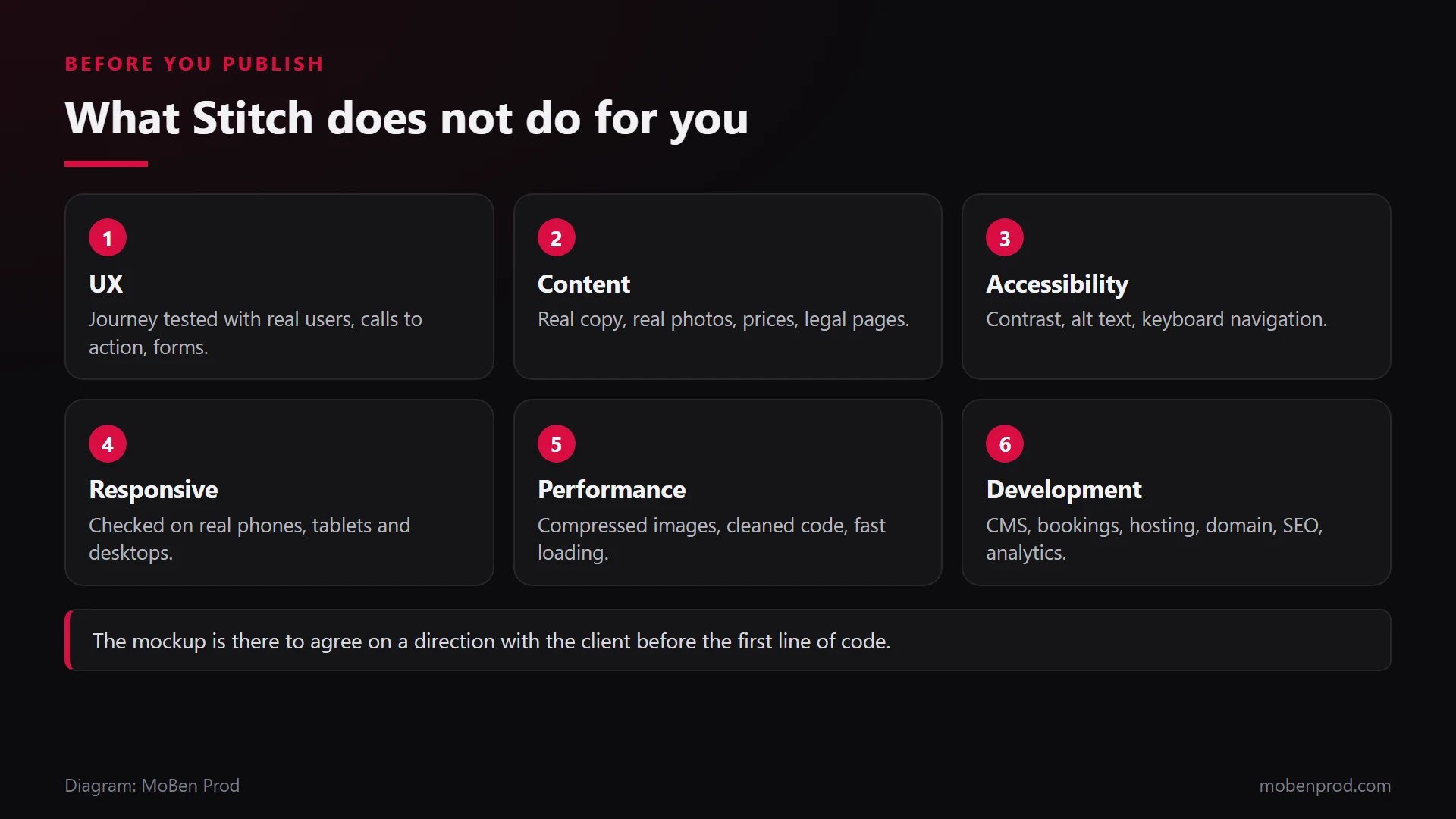
A Stitch mockup looks like a website, but it is not one. Here is what I check before moving on to development.
- UX: has the journey been tested with real people? Is the main button visible without scrolling? Does the form only ask for what is needed?
- Content: replace the generated copy and photos with the real ones. Add prices, opening hours, legal notice and privacy policy.
- Accessibility: enough contrast between text and background, alt text on images, readable font sizes, keyboard navigation.
- Responsive: a Web mockup does not turn into a mobile version by itself. Check every page on a real phone, a tablet and a computer.
- Performance: compress images, remove unused code, check loading time on a mobile connection.
- Real development: the exported HTML is a base. You still need a CMS to edit content, the real booking or payment system, hosting, a domain name, technical SEO and analytics.
What are the alternatives to Google Stitch?
Stitch is not the only tool that goes from text to interface. Here are the ones I checked on their official pages in November 2026.
Inside Figma
- Figma Make: turns a prompt into a prototype or a coded app, using your design system, frames and images. The result stays editable in Figma. Figma gives AI credits by plan (on the free Starter plan, 150 a day and 500 a month at most): check its pricing page for what your plan allows in Make.
- First Draft: creates an editable wireframe or design in Figma Design from a prompt. Available on Professional, Education, Organization and Enterprise plans. Since 20 May 2026, Figma has been gradually replacing it with its agent, in beta.
AI website builders
- Framer AI: generates a site from a prompt that you refine and then publish with Framer hosting. The free plan includes a Framer domain and 500 AI credits a month.
- Relume: assembles a full marketing site, structure and copy included, from components. Export to Figma, Webflow or React. Building is free; hosting on your own domain starts at 12 dollars per site per month.
App mockups
- Uizard Autodesigner: creates editable app screens and prototypes from prompts, using your brand kit. Free plan limited to 2 projects and 3 AI generations a month.
From prompt to code
- v0 by Vercel: builds and deploys web apps, with a visual editing mode. The free plan gives 7 messages a day.
- Lovable: builds websites and web apps through chat, without coding. The free plan gives 5 credits a day, up to 30 a month.
- Bolt by StackBlitz: builds websites, apps and prototypes through chat. You can start for free.
What about Galileo AI?
Galileo AI’s address, usegalileo.ai, now redirects to Stitch: if you were looking for Galileo, this is where you land.
My take on Stitch as a designer
I use it as a moodboard that speaks the language of the web. In an hour, I can show a client three directions built on their real content, instead of sending screenshots of sites that have nothing to do with their business. The clickable prototype also helps validate a journey before paying for any development, and it avoids vague feedback such as “I don’t know, something is missing”, which I cover in my article on client feedback.
But I never deliver a Stitch mockup as it is. Layouts quickly look alike from one project to the next, the generated copy is generic, and the brand identity is still to be built: logo, typefaces, tone. For that part, my guide on visual identity and brand guidelines remains the base. Before adopting Stitch for good, test it on a real project and measure the time saved, as I explain in my method for testing a tool.
Frequently asked questions
Is Google Stitch free?
Google publishes no price: a Google account is enough. Usage is capped by a daily credit quota, shown in the tool when you reach it.
Does Stitch build a website ready to publish?
No. It creates mockups, a clickable prototype and base HTML code. Real content, accessibility, responsive design, performance and development are still to do, even though Stitch can publish a version through Netlify.
Can you export a Stitch design to Figma?
Yes, depending on the options offered for your project. The documentation recommends the Fast mode for Figma exports. Otherwise, download the ZIP and import it with the html.to.design plugin.
Does Stitch work in French or Arabic?
The documentation is in English and I recommend writing prompts in English. You can then ask Stitch to translate all the copy. For Arabic, check that the whole layout really flows from right to left.
Have a Stitch mockup and want to turn it into a real website that is fast and easy to update? Let’s talk about your website project.
Go further