Palette or colour system: give every colour a role
A palette becomes a system when every colour has a role: the background, the text people must read, the accent that has to stand out. Then you check each colour’s contrast against the one behind it, on a real title, paragraph and button.

MoBenFreelance video creator
Contents
- What is the difference between a palette and a colour system?
- How do you give each colour a role?
- How do you check contrast between text and background?
- Can a colour work as a detail and fail as a background?
- Why test a palette on a title, a paragraph and a button?
- Which tools check contrast?
- What about video: thumbnails, subtitles and motion design?
- Frequently asked questions
A palette is a list of colours. A colour system is the same list with a role for each one: a background colour, a colour for the text people have to read, and an accent for what needs to stand out, like key information or a button. Without these roles, even a title stops standing out.
You found a palette you love, five squares that look great together. Then you use it on a page, a thumbnail or a video, and nothing stands out anymore. Choosing colours is not the same as distributing colours. Here is the method I apply before drawing anything.
What is the difference between a palette and a colour system?
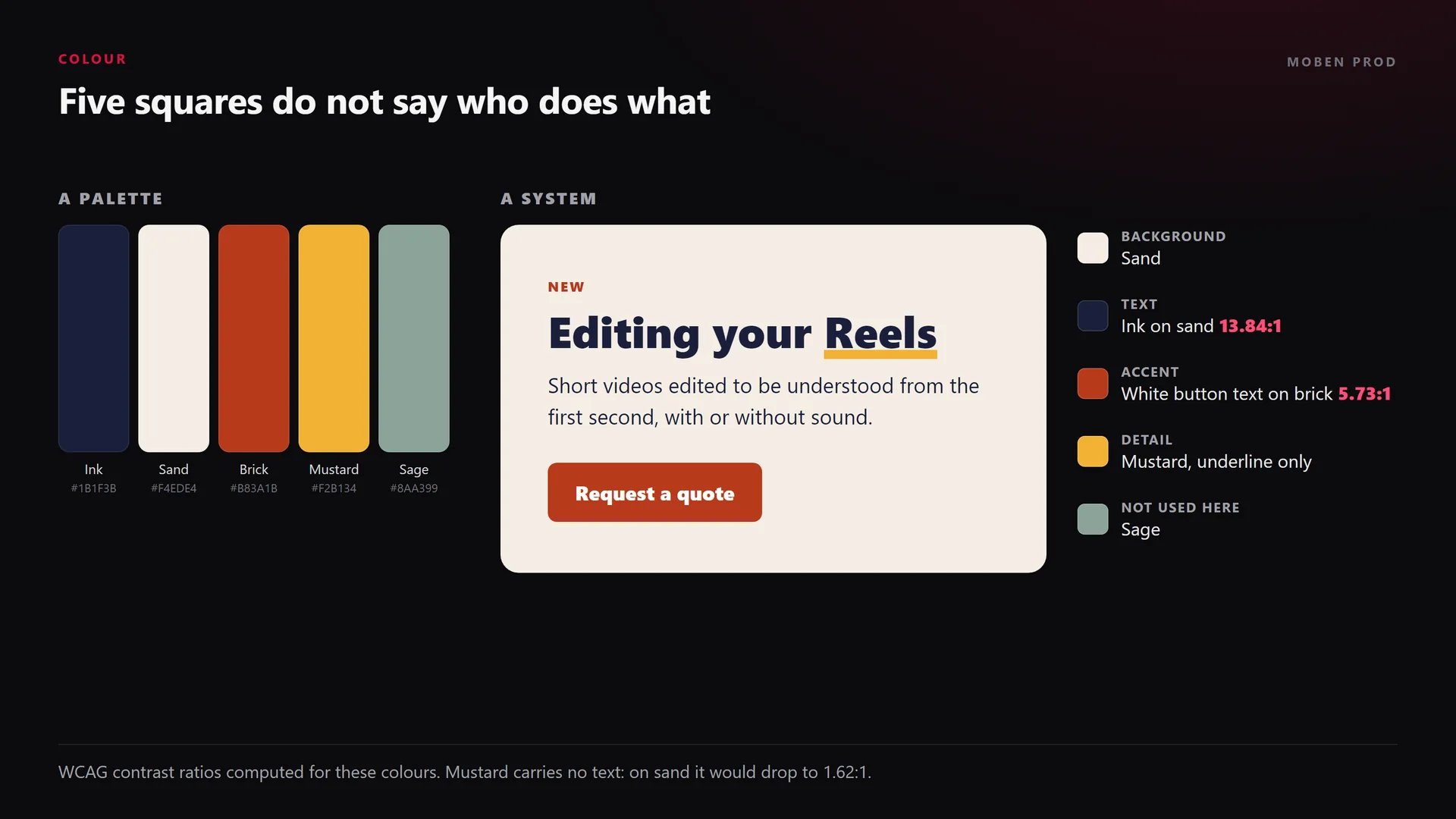
A palette answers “which colours?”. A system answers “which colour for what, and on top of what?”. In the example below, the same five-colour palette becomes a system: sand is the background, ink carries the text, brick is kept for the button and small markers. Mustard only appears as an underline, and sage is not used at all.
How do you give each colour a role?
- Background: the colour that covers the most area. It stays calm so everything else can be read.
- Text: the colour of titles and paragraphs. It contrasts strongly with the background.
- Accent: one colour for what must catch the eye, like a button, a price or a keyword. The rarer it is, the more it stands out.
- Secondary colours: borders, icons, small details, states (hover, error). They do not carry important text unless their contrast allows it.
You do not have to use every colour in the palette, or in equal amounts. Many designers start from the 60-30-10 rule of thumb: about 60% for the dominant colour, 30% for the secondary one and 10% for the accent. It is not a standard, just a starting point that stops you from giving everything the same weight.
How do you check contrast between text and background?
A colour is never judged on its own: it is judged against the colour behind it. WCAG measures that gap with a contrast ratio, from 1:1 (no difference) to 21:1 (black on white). The thresholds to know:
- 4.5:1 for body text, level AA (criterion 1.4.3).
- 3:1 for large text, meaning at least 18 point, or 14 point bold (about 24 px and 18.5 px).
- 3:1 for interface components and graphics needed to understand the content, like a field outline or a standalone icon (criterion 1.4.11).
- 7:1 for body text and 4.5:1 for large text at the enhanced AAA level (criterion 1.4.6).
“Contrast is calculated in such a way that color (hue) is not a key factor.” W3C, Understanding SC 1.4.3
In other words, the difference in lightness is what counts. A red and a green that look very different can have almost the same lightness, and so very low contrast. The W3C also states that the ratio is not rounded: 4.499:1 does not meet the 4.5:1 threshold.

Can a colour work as a detail and fail as a background?
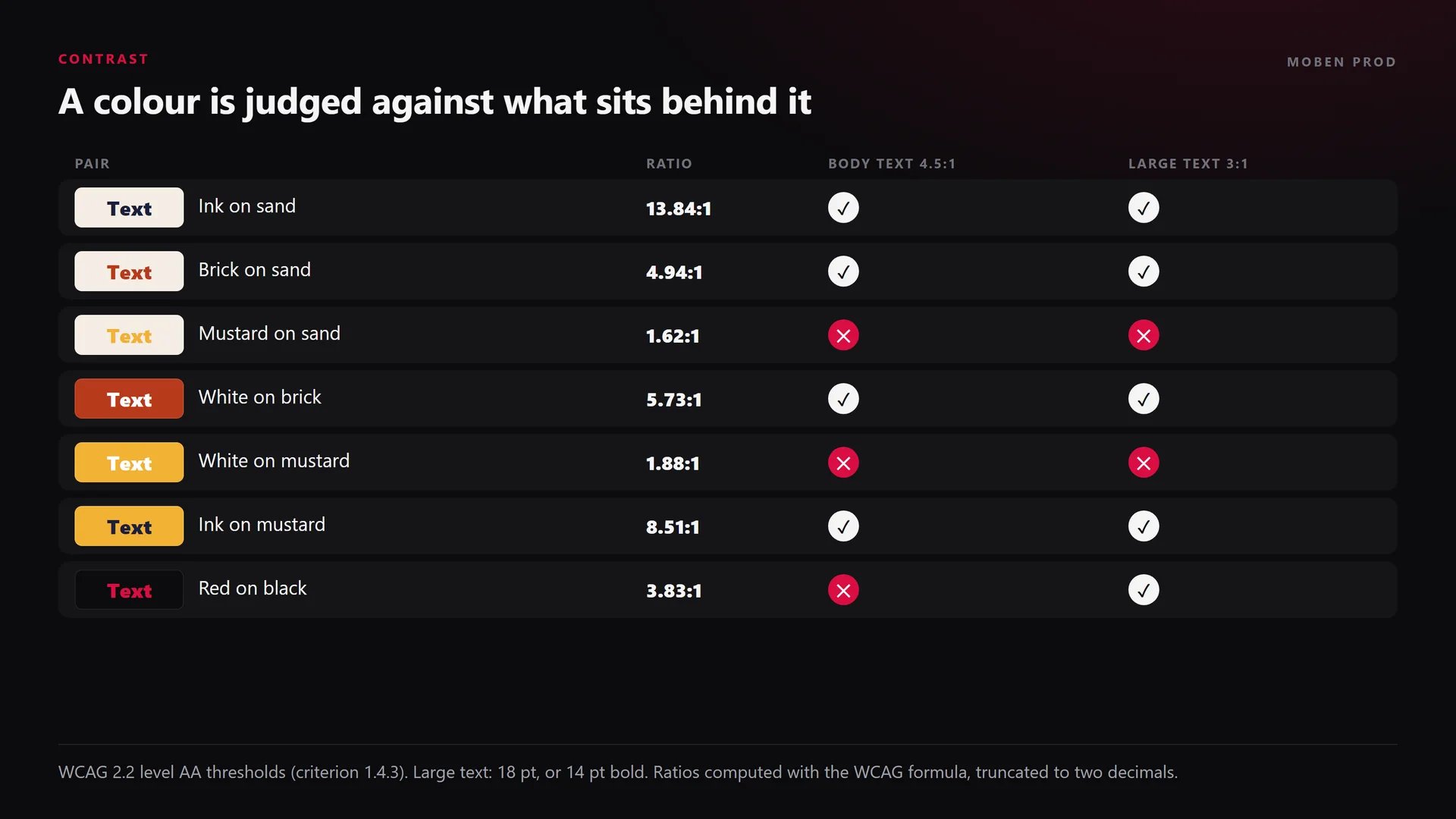
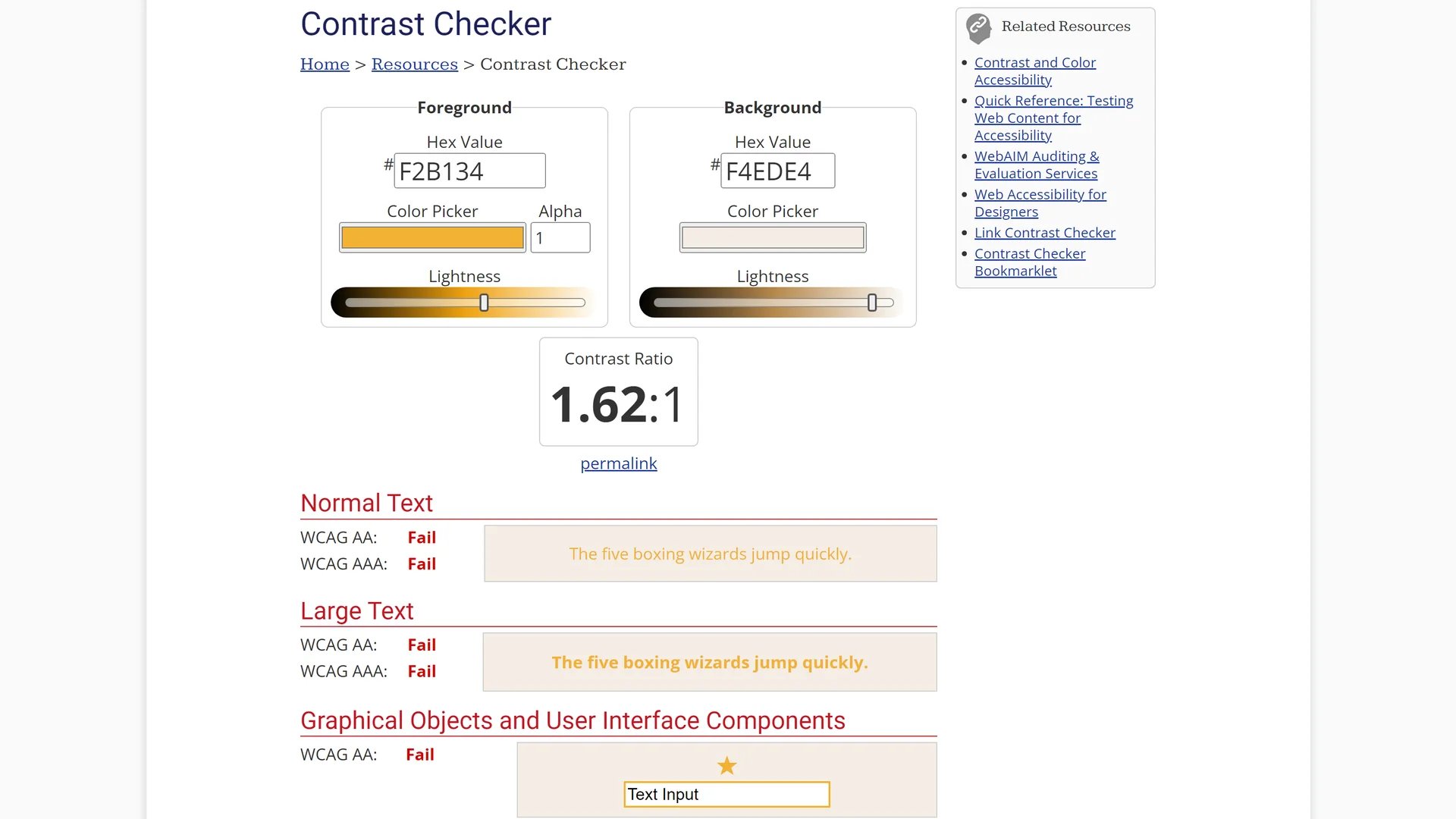
Yes, and that is often where a palette breaks down. In my example, mustard on sand tops out at 1.62:1: no text can live there. It is still useful as a small decorative detail, like the title underline, which does not need to be read. And if it becomes a button background, the label must be ink (8.51:1), because white drops to 1.89:1.
Same logic for the MoBen Prod red, #D90E43, on a near-black background: 3.83:1. It works for a large title, not for a paragraph. That is why, on this site, it is used as an accent and body text stays light.
Why test a palette on a title, a paragraph and a button?
Five squares side by side show none of this. Before approving a palette, I build a small mockup with a real title, a few lines of paragraph and a button, on the intended background. Then I check:
- does the title stand out at first glance?
- is the paragraph easy to read, even small?
- is the button the first thing you notice after the title?
- is there one accent colour, or three fighting for attention?
This test takes a few minutes and saves you from finding the problem once the site is live. The colour rules then go into the brand guidelines, as I explain in the article on visual identity, brand guidelines and brandbooks.
Which tools check contrast?
- WebAIM Contrast Checker: enter two hex codes and the tool gives the ratio, with AA and AAA results for body text, large text and interface components. A lightness slider helps fix a colour that fails.
- Adobe Color accessibility tools: a contrast checker compared against WCAG, and a tool that flags colours that are hard to tell apart for people with colour blindness.
- Colour Contrast Analyser (Vispero, formerly TPGi): a free app for Windows and macOS, with an eyedropper that samples colours anywhere on screen. Handy on a video frame or a mockup.
- Chrome DevTools: the color picker tells you whether a text’s contrast meets AA or AAA, right on the live page.
What about video: thumbnails, subtitles and motion design?
The same roles apply to moving pictures, with one extra difficulty: the background changes with every shot.
- Thumbnails: one background, one text colour, one accent. The title has to stand out at a tiny size, in a grid of other thumbnails.
- Subtitles: the background is the video itself. The BBC uses white on black in most cases; on a bright shot, add an outline, a shadow or a box. More in the article on readable subtitles.
- Motion design: save the accent for the key moment (a number, a name, a call to action) instead of flashing it everywhere.
I check contrast on the brightest and busiest frame of the sequence, not on the easiest one.
Frequently asked questions
How many colours does a system need?
Three roles are often enough: a background, a text colour, an accent, plus one or two secondary colours for details. What matters is not the number of colours but that each one has a clear job.
What contrast ratio should a button have?
The button label is text like any other: 4.5:1 against the button colour, or 3:1 if it is large enough. The button background must also stand out from its surroundings (3:1) when it is what identifies the button.
Can a brand colour fail the contrast test?
Yes. WCAG exempts text that is part of a logo, but not titles or buttons. If the brand colour fails, keep it for large elements and accents, and create a darker or lighter variant for text.
Is the 60-30-10 rule mandatory?
No, it is a rule of thumb. It helps you avoid spreading every colour equally, but an interface, a poster or a video can use other proportions. The title, paragraph and button test is more reliable.
A palette takes minutes to choose; a system is built by testing. It is the foundation of my work in branding and visual identity, and it carries through to website creation and video. Tell me about your project.
Go further